

Design, Creation, and Practical Use
The rather wonderful Mats Warnolf and I had the privilege of doing a session at my favourite conference venue, the National Museum of Computing at Bletchley Park.
We presented the session as a discussion. As such the slides don’t tell the full story. To capture what we said we ran Microsoft Teams in parallel and used the captured audio and iThink SmartFlo AI to produce a structured article based on what we said. Here it is.
Session date: 24/09/2025
Presenters: Simon Hudson, Mats Warnolf
Event: CollabDays Bletchley
Understanding Content Types
Content types in SharePoint Online are a fundamental feature that allows organisations to standardise and manage metadata, templates, and behaviours for documents and items. They have been a part of SharePoint since its inception but have become less prominent in recent years. This session aimed to reintroduce their importance and practical use.
Content types allow users to define the structure and metadata of documents, such as contracts or project charters. For example, a contract content type might include fields for client name, contract value, and expiration date. This standardisation ensures consistency across libraries and sites.

Benefits of Content Types

- Standardisation and Uniform Metadata: Content types provide a consistent structure for documents, ensuring uniform metadata across libraries and sites.
- Improved Search and Tagging: Metadata fields associated with content types enhance searchability and tagging, making it easier to locate documents.
- Reusability: Once defined, content types can be reused across multiple SharePoint sites, reducing duplication of effort.
- Automation and Compliance: Content types can trigger automated workflows, such as applying retention labels or generating PDFs for archiving. They also support compliance by attaching specific rules to document types.
- Minimised Folder Dependence: By using metadata and views, content types reduce the need for traditional folder structures, offering a more flexible and logical organisation.

Practical Challenges and Adoption

Implementing content types requires careful planning and user training. Key challenges include:
- User Resistance: Transitioning from traditional folder structures to metadata-based organisation can be met with resistance.
- Overengineering: Creating overly complex content types can overwhelm users and hinder adoption.
- Generational Differences: Different user groups may have varying levels of comfort with new systems.
To overcome these challenges, organisations should focus on user journeys, provide clear training, and avoid overcomplicating the solution.
Implementing Content Types Effectively
- Planning: Define the metadata fields and structure required for each content type.
- Creation: Use the SharePoint site settings to create content types and associate them with site columns.
- Deployment: Add content types to document libraries and configure views to display relevant metadata.
- Maintenance: Regularly review and update content types to ensure they meet organisational needs.
Strategic Considerations
Content types play a crucial role in compliance and governance. For example, defining a document as a contract allows organisations to automate retention policies and ensure legal compliance. Additionally, content types can trigger workflows, such as generating PDFs or archiving documents.
While folders have their place, particularly for syncing with desktop systems, metadata and content types offer a more robust and scalable solution for document management. The challenge is to persuade people to adopt them over the familiarity and apparent simplicity of nested folders; their limitations are not always apparent to people not looking at the larger information architecture picture.

Demonstration Highlights
The session included a live demonstration of creating and managing content types. Key steps included:
- Defining a new content type for project status reports.
- Adding metadata fields, such as reporting period and next milestone.
- Associating the content type with a document library and configuring views to display metadata.
- Highlighting the importance of using site columns to ensure consistency across libraries.
Conclusion
Content types are a powerful tool for managing documents in SharePoint Online. By standardising metadata, improving searchability, and supporting compliance, they offer significant benefits for organisations. However, successful implementation requires careful planning, user training, and ongoing maintenance.
Session slides
Insights
- Content types are essential for standardising metadata and improving document management in SharePoint Online.
- Overengineering content types can hinder adoption; simplicity and user training are key.
- Content types support compliance by enabling automated retention policies and workflows.
- Folders are still useful for syncing with desktop systems but should be used sparingly.
Takeaways and more
- Plan metadata and content types carefully to meet organisational needs.
- Use site columns to ensure consistency across libraries and sites.
- Provide user training to facilitate adoption of metadata-based organisation.
- Avoid overengineering content types to keep the user experience simple.
- Leverage content types for compliance and automation, such as applying retention policies.
What kind of a person are you?
We opened our session with a fun survey, provocatively titled “Are you a dishwasher Fascist?”
The results were interesting. That there are more latent information architects in our session than in the general population should not be a surprise however.

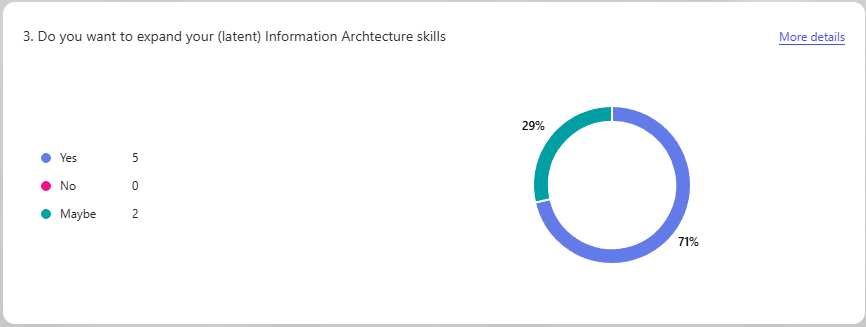
If you want to check what kind of an Information Architect you might be you can now take the survey too.

 Novia Works Ltd