

My thinking has evolved a little further with regards to using Office 365 collaboration since my last blog. This is driven by some further investigation into the recent upgrades to Office 365 Groups and Microsoft Teams.
As mentioned before, these are somewhat interchangeable in terms of their intended purpose and both have a proper SharePoint team site on the back end which extends their capability into being actively useful. For those that remember Windows SharePoint Services (WSS) or the more recent SharePoint Foundation, Groups and Teams essentially are the modern successor. The most immediate difference between them is that Groups are email-centric while Microsoft Teams is (Skype) chat-centric; however, there are some different components presented in each. Stand-alone, they are great for very lightweight intranets and team collaboration; combined with other parts of Office 365 they offered the ability to build out midrange digital workspaces. They fill a very useful role for unmanaged or lightly managed collaboration, though some organisations will choose OneDrive for Business for their unmanaged collaboration needs, leaving Groups and Teams for lightly managed role.
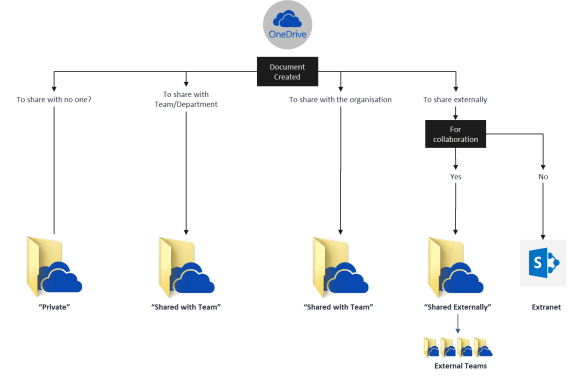
When it comes to OneDrive for Business, we propose a Best Practice folder structure to that consists of:
- Private
- Shared with Team (<owner name>)
- Shared with Everyone (<owner name>)
- Shared Externally
We also commonly recommend a mechanism for managing organisational Office templates using OneDrive for Business, where we add the Custom Office Templates folder to our OneDrive for Business and point the Office clients at that.
Then there is Yammer… This also can store and share documents and allow a form of collaboration around them. Using Yammer in this way never felt very natural to us, but it was part of the original design of the product before Microsoft acquired it, and it may well suit some organisations. However, by embedding Yammer within a SharePoint page in an intranet, it becomes particularly useful for wrapping a shared conversation around a document, or conversely adding documents to a shared conversation.
The trouble with all this is that users are uncertain about where to store information. It’s a problem we’ve talked about before; with the excellent search now available across Office 365 through SharePoint and Delve – combined with an effective metadata strategy – the problem of ‘Findability’ is largely addressed. Unfortunately, ‘Putability’ – knowing where to store your content -remains a challenge.
The lovely people at Tata Steel have put a lot of thought into this which aligns closely with our thinking and so I share this extended version of their decision tree with their permission:
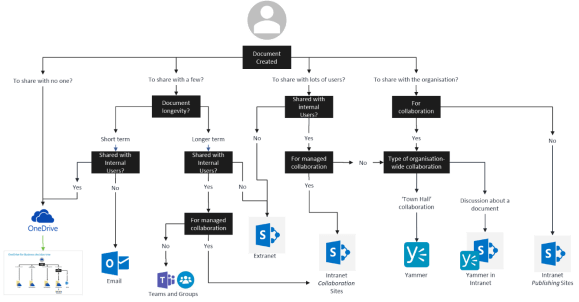
As you can see, it’s fairly complex and this reflects the complex nature of the content that we expect people to deal with on a day-to-day basis. It is, however, fairly easily explained as follows:
- Keep your own stuff in OneDrive and if you need to, share it with your team unless you have a team site or group for that
- Team and project content should go into the relevant intranet team site, or a Microsoft Team or Office 365 Group if it doesn’t have sophisticated processes wrapped around it
- If it doesn’t need collaboration, then publish it to an intranet publishing area such as the HR site or a Document Centre
- If you need to shared externally and consider a dedicated extranet, though OneDrive for Business could be used for non-sensitive content
- Anything which isn’t reliant on storing the document could be done using Yammer or email
There is no harm in embedding the above in a governance or user guide which is actively shared with your users. The better they understand where to put their content the easier it will be to find things later and much easier to keep everything managed.

 Novia Works Ltd
One reply on “Putability – More thoughts on Office 365 for collaboration”
[…] This is effectively Part Three in a series of blogs on managing content across the organisation, as part of moving to a cloud. I’ve previously mused on Microsoft Teams and Office 365 Groups, as well as the complex issue of ‘Putability’. […]