

Suno recently introduced an MCP server that allows an AI assistant to work directly with your Suno account. That changes the relationship between an AI assistant and Suno quite significantly. Instead of asking your preferred AI assistant to develop lyric cues, such as [Bridge][solo piano][male vocal], and a style description, then copying them into Suno, generating something, reviewing it and repeating the process, the assistant can potentially search your Suno library, retrieve information about existing music and invoke Suno tools directly. can potentially search your Suno library, retrieve information about existing music and invoke Suno tools directly. It smooths the workflow and opens up synergies between your general purpose AI and the dedicated music creation AI.
There is one slightly awkward omission for us Microsoft folk. Suno’s current MCP documentation gives explicit instructions for connecting Claude, ChatGPT, Gemini, Cursor and Claude Code, but doesn’t even slightly mention Copilot. Suno provides a useful MCP server at https://api.suno.com/mcp but doesn’t document how to make that OAuth connection from Microsoft 365 Copilot. The supported public AI services handle the authorisation flow automatically, while the Microsoft route is less obvious if you start by looking for a Suno client ID and secret.
I have solid reasons for wanting to use Microsoft 365 Copilot, since it gives me access to multiple frontier models from OpenAI and Anthropic while also having access to my creative content in Microsoft 365 and SharePoint. I decided to do battle with the aid of Copilot and Claude to see whether M365 Copilot could be persuaded to talk to Suno via MCP.
Spoiler: It worked!
I now have Suno running as an authenticated MCP service from inside Microsoft 365 Copilot.

Only connect
My first instinct was to add Suno through the connector management facilities in Microsoft 365. That quickly led into questions about OAuth configuration, reference IDs and exactly how Suno authenticates its MCP clients. The breakthrough was discovering that Suno publishes standards-based OAuth metadata and supports Dynamic Client Registration. That meant I did not need a pre-existing Suno client ID, client secret or API key. Microsoft 365 Agents Toolkit could register the connection automatically. I explain the discovery process and the relevant endpoints below.
It turns out that Suno and Microsoft already speak the same language, via MCP; the trick is using the right Microsoft extensibility route. Claude was a bit vague about the practical route. Copilot initially suggested several complex options, probably beyond my technical ability, including building a Copilot Studio agent and doing scary things in Visual Studio Code. Actually, the VS Code turned out to be not too bad at all; it was probably obvious for an actual developer (I last wrote proper code on the Motorola 68000 processor – yes, that long ago), but simple enough with AI guidance. Let’s look at the process for anyone else who wants to bring songwriting into Microsoft 365 (or has an analogous need).
If you want to know more about AI and music here’s a long article on the subject.
Let’s connect Suno
I used Visual Studio Code and Microsoft’s Microsoft 365 Agents Toolkit. Microsoft documents this as a supported way to create a declarative agent around an existing MCP server, and specifically says that if the server supports OAuth 2.0 Dynamic Client Registration, you can choose OAuth (with dynamic registration) without creating a client ID or secret manually.
The process was:
- Install Visual Studio Code if it isn’t already installed.
- Install the Microsoft 365 Agents Toolkit extension.
- In Agents Toolkit, select Create a New Agent/App.
- Choose Declarative Agent.
- Choose Add an Action.
- Choose Start with an MCP Server.
- Enter Suno’s MCP endpoint: https://api.suno.com/mcp
- For authentication choose OAuth (with dynamic registration).
- Choose a project folder and give the application a name. I used Suno MCP for Copilot.
- Sign into Agents Toolkit with the Microsoft 365 account that has access to Microsoft 365 Copilot.
- Check that Agents Toolkit reports both Custom App Upload Enabled and Copilot Access Enabled.
- Provision the application.
Microsoft’s own MCP walkthrough follows essentially this pattern. Agents Toolkit generates the agent and plugin manifests, uses dynamic tool discovery against the MCP server and provisions the development agent into the Microsoft 365 tenant. In my case the entire provisioning sequence completed successfully, once I figured out the OAuth stuff.
How the OAuth connection was discovered
As I mentioned, Microsoft wanted an authenticated connection to the MCP server, but Suno didn’t document the Microsoft 365 route or provide a client ID and secret. Initially I feared this might be a deal-breaker. The important discovery was that we didn’t actually need static credentials at all, even though it’s undocumented:
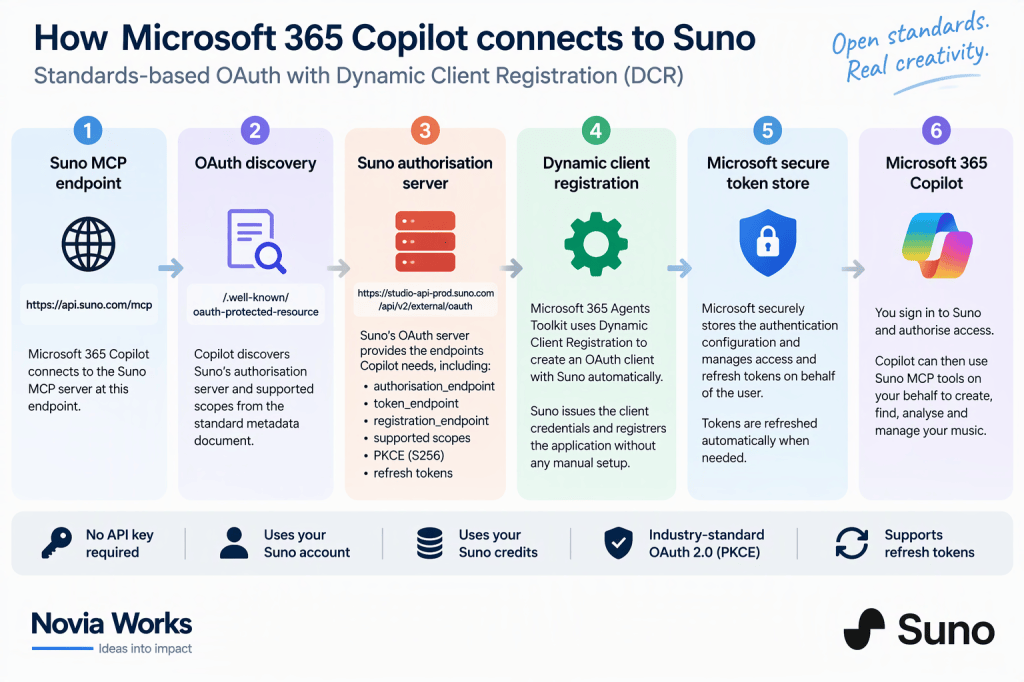
- Starting with the MCP endpoint, we queried Suno’s standard OAuth protected-resource discovery address, https://api.suno.com/.well-known/oauth-protected-resource.
- That returned the authorisation server https://studio-api-prod.suno.com/api/v2/external/oauth together with the available scopes.
- We then queried that server’s standard /.well-known/oauth-authorization-server metadata document. This exposed the actual authorization_endpoint, token_endpoint and the registration_endpoint, as well as confirming support for the authorization_code and refresh_token grants, PKCE using S256, and client authentication using client_secret_basic or client_secret_post.
That was the key discovery: rather than needing to obtain and manually enter a Suno client ID and secret, Suno supports OAuth Dynamic Client Registration. We could therefore choose OAuth (with dynamic registration) when adding the Suno MCP server in Microsoft 365 Agents Toolkit, allowing Microsoft and Suno to negotiate the OAuth client registration automatically. Copilot guided me through the process one step at a time. I posted screenshots of each screen, and it told me what to select next (I had abandoned Claude by now). It was a lot of screenshots (I have Shift-Win-S hardwired into muscle memory), but quite straightforward.
The preview step
One minor wrinkle was previewing it once Microsoft 365 Agents Toolkit had successfully provisioned the agent. I needed a reliable way to open that specific development agent in my normal Novia Works Microsoft 365 Copilot session. Agents Toolkit insisted on launching Edge in my personal Edge profile rather than the signed-in Novia Works profile. I thought I was going to have to fight that.
The fix
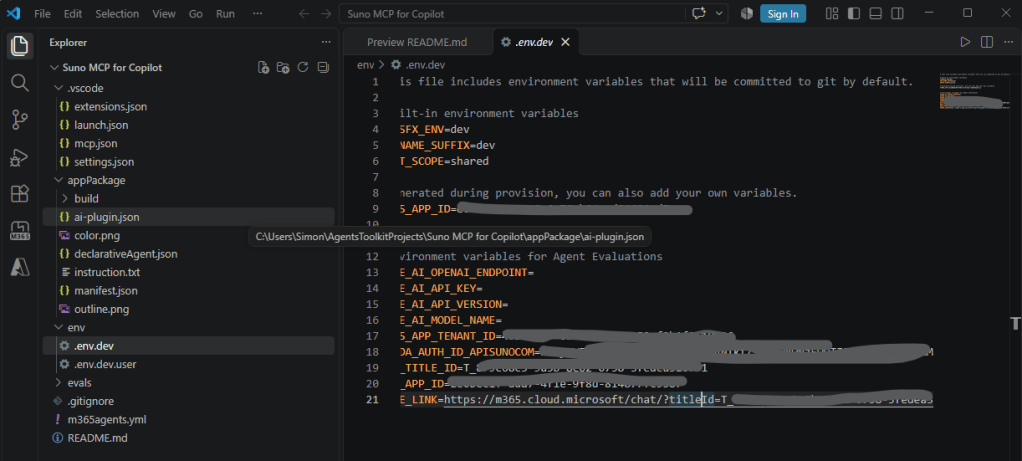
In Visual Studio Code, I opened the Explorer for my Suno MCP for Copilot project, expanded the env folder and opened .env.dev. Agents Toolkit had generated this file during provisioning and populated it with identifiers for the newly created Microsoft 365 application and agent. At the bottom was a particularly useful variable called SHARE_LINK, containing a URL beginning: https://m365.cloud.microsoft/chat/?titleId=…. Rather than using Preview Your App (F5), which was launching a separate Edge debugging instance under the wrong browser profile, Ctrl-select the URL after SHARE_LINK= and opened it in my existing Edge profile, where I was already signed into the correct Microsoft 365 tenant. That took me directly to the newly provisioned Suno MCP for Copilotdev agent in Microsoft 365 Copilot.
If the Toolkit preview launches Copilot under the wrong browser identity, look in your project → env → .env.dev → SHARE_LINK and use that generated link instead.
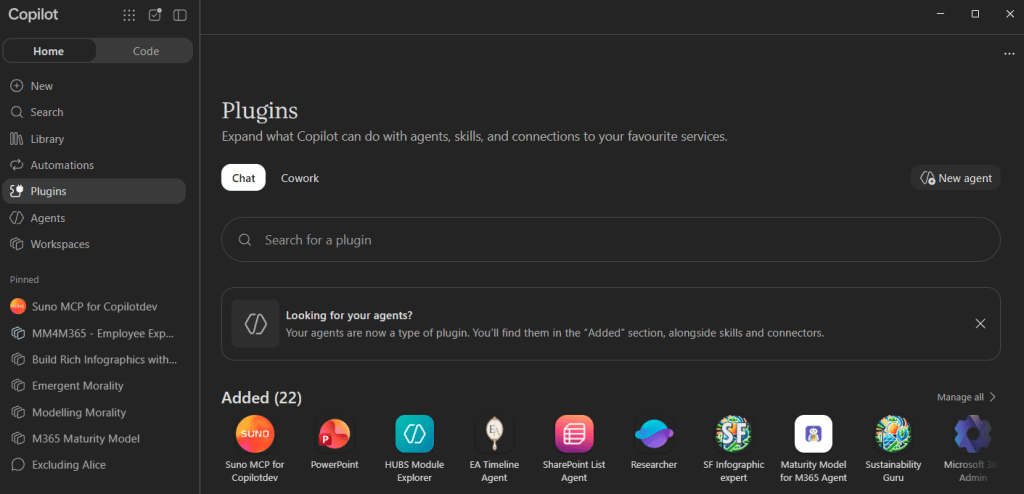
Microsoft also documents that provisioned development agents appear in Microsoft 365 Copilot with dev appended to their name. I therefore ended up with: Suno MCP for Copilotdev inside Microsoft 365 Copilot.
The moment of truth
I asked my new M365 Copilot agent What Suno tools do you have available? Microsoft 365 Copilot immediately responded by asking me to sign into Suno. I selected the sign-in option, authenticated against my Suno account and authorised the connection.
It worked.
That is worth dwelling on… no manual creation of a Suno OAuth application, no API key and no copying of client secrets between platforms. Suno’s OAuth infrastructure and Microsoft’s Dynamic Client Registration implementation negotiated the connection between themselves, which is exactly what DCR is intended to achieve. Microsoft explicitly describes DCR as allowing an MCP plugin to register an OAuth client automatically rather than requiring the developer to create credentials in advance.
Does it actually get into Suno?
Authentication is one thing but was it really talking to Suno? I asked it to search my Suno library for a recent musical creation, ‘In the Eyes‘. An exact search wasn’t particularly successful, but broadening the search to the significant word “Eyes” found three relevant items: two Suno v6 generations of my song In the Eyes and the original uploaded recording used as the source to build the song. Copilot returned their Suno song IDs, creation dates, models and liked status, and correctly distinguished the uploaded source recording from the two generated tracks.
Microsoft 365 Copilot is authenticating as me, invoking tools on Suno’s MCP server and retrieving information from my actual Suno library.
One practical lesson emerged immediately: Suno’s library search seems happier with distinctive keywords than exact song titles. Searching for “In the Eyes” wasn’t particularly successful; searching for “Eyes” found all three relevant items.
Suno says that its MCP can create songs conversationally, work from uploaded audio and create covers, extensions and mashups, with resulting songs stored in the user’s Suno library. Note that creation consumes the normal Suno credits associated with the account.
Invoking my new tool
I can invoke it by selecting it from the Plugins page in Copilot (or whatever it’s called by the time you read this), where I have also pinned it. I can also use @Suno in chat.
Belt and braces, I also grabbed the direct URL (the bit after SHARE_LINK in .env.dev) and added it as a Edge Favourite, which opens Copilot directly into the plugin.
One irritation: confirmation prompts
There is still some friction. Microsoft 365 Copilot may show confirmation prompts when the Suno MCP tools are invoked. Microsoft deliberately treats actions differently according to their potential consequences. For MCP tools, the server can identify a tool as read-only by returning readOnlyHint: true. Once the initial plugin connection has been allowed, appropriately annotated read-only operations should not normally require repeated confirmation, although current Remote MCP behaviour in Microsoft 365 Copilot can still produce more prompts than expected. Operations with side effects are treated more cautiously. Searching my library, retrieving metadata or analysing an existing track ought to be low-friction read operations. Creating a new song, spending credits, editing metadata, publishing something or deleting content are different. I quite like the idea of Copilot pausing before it spends credits or changes my Suno library.
The ideal experience would therefore be closer to:
- Search library → just do it
- Read song metadata → just do it
- Analyse recording → just do it
- Generate new song → confirm
- Create cover → confirm
- Extend track → confirm
- Publish/delete/edit → confirm
How close we can get to that depends partly on the annotations Suno supplies with its MCP tools. Microsoft allows the MCP server developer to control this behaviour through the MCP tool definitions.
Tidying and publishing the agent
Before publishing, I tidied the agent’s identity in Visual Studio Code. In appPackage/manifest.json I changed the short name to Suno, the full name to Suno for Microsoft 365 Copilot, added a useful description, and replaced the placeholder developer details with Novia Works Ltd and its real website, Privacy Policy and Terms of Use URLs. I then replaced the default Agents Toolkit artwork with the official Suno branding: color.png must be a 192 × 192 px colour icon, while outline.png must be exactly 32 × 32 px and contain only solid white and fully transparent pixels. That last requirement is surprisingly strict, including no anti-aliased semi-transparent pixels. After editing the package I increased the manifest version from 1.0.0 to 1.0.1, because Microsoft will not update an existing Copilot title unless the new package has a higher version.
Finally, I ran Provision again from Microsoft 365 Agents Toolkit. This rebuilt and validated the package, updated the existing Microsoft 365 app while retaining the previously created Suno Dynamic Client Registration, and republished the development version of the Copilot agent.
After testing the updated agent through the generated SHARE_LINK, I selected M365 Agents Toolkit → Lifecycle → Publish to Organization. All four publication actions completed successfully, and Suno appeared in the Microsoft 365 admin centre Agent Registry as an available agent published by Novia Works Ltd.
By default it is only available to me (fine in this case). If you want others to have access then open it in Microsoft 365 Copilot, select the ellipsis (…) beside the agent. From there you can select Share and add the required users/groups, or copy its sharing link. If you need everyone to access it then it needs to be deployed into the organisation’s Agent Store, appearing under Built by your org.
Now what?
Simply operating Suno from Copilot is useful, it let’s me easily access a bunch of information less easily found from the Suno UI. However, I don’t think that is the real opportunity. Suno has now become one tool within the wider Microsoft 365 working environment.
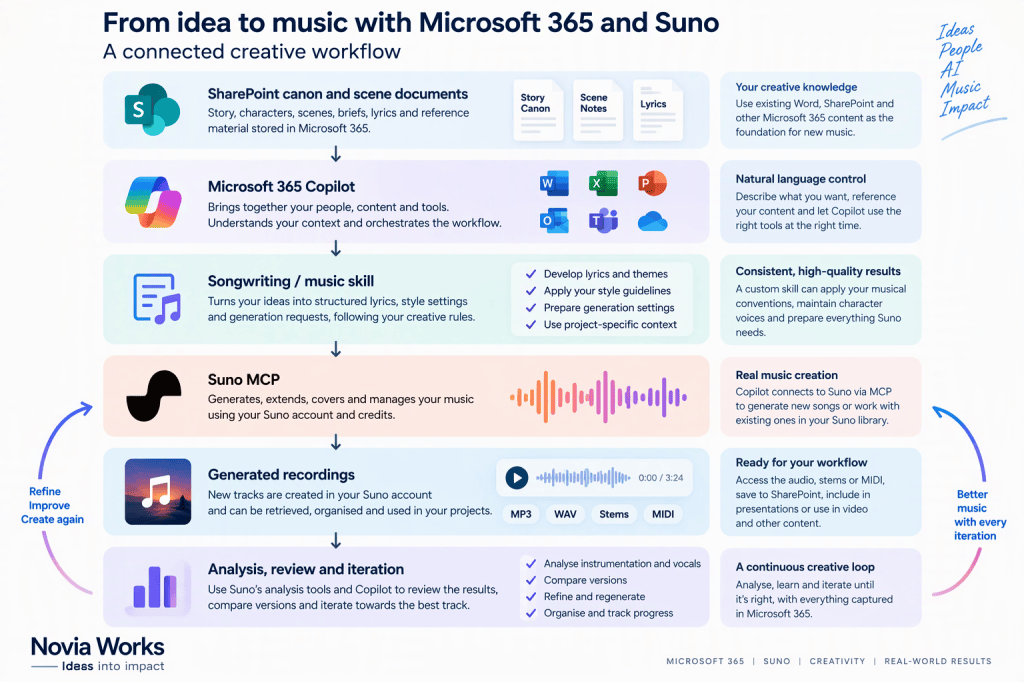
Consider writing a song whose lyrics and background material are already being developed in Word, OneNote and SharePoint. A Copilot chat or agent could retrieve the source material, examine previous drafts, develop the lyrics according to established creative rules, find earlier versions of the song in Suno and generate the next candidate without me shuffling text between applications.
For my Excluding Alice musical, for example, SharePoint already holds a governed set of story, scene and character material. The established canon includes musical and vocal constraints such as Alice being a contralto and Annie a soprano. An agent working with that Microsoft 365 knowledge and the Suno MCP potentially gets us much closer to a governed pipeline:
There are plenty of less theatrical examples.
A marketing team could develop campaign material in Word and SharePoint, use Copilot to derive an appropriate brief for music, invoke Suno for candidate material and record the chosen music and associated rights or usage information back into the project library.
A video-production process could combine a PowerPoint storyboard, a script held in Word and a production brief in SharePoint, then use the Suno connection to create or locate suitable music.
Teams could become the conversational front end. Instead of everybody needing to understand Suno prompting, a member of the project might simply ask an appropriately governed agent for three music concepts based on the project’s existing creative brief.
Planner could provide the project wrapper: compose, review, approve, create stems, mix, create artwork, publish. The agent can help turn the creative process into a visible workflow rather than leaving decisions scattered between Suno sessions and chats.
And there is an interesting possibility around Excel. A structured catalogue of recordings, versions, song IDs, models, dates and review scores could give an artist a much better overview of an increasingly large AI-assisted music library. Copilot could then combine the structured catalogue with live information retrieved from Suno.
The fact that Microsoft 365 Copilot agents can work with organisational knowledge and data sources is precisely what makes this worth the effort.
Skills
Connecting the MCP server is really only the plumbing (which isn’t my area of competence). Skills are where I think it becomes tailored to a real creative workflow. I am now thinking about a bunch of skill files
Suno Song Development
This would encode the rules for turning a musical idea into a controlled Suno generation: establish musical intent, prepare lyrics and global style instructions, check them against the current Suno conventions, show the proposed generation settings, then invoke Suno only after the creative brief is settled.
For my own workflow it would also incorporate the Suno v6 conventions I’ve already established rather than relying on the general-purpose agent to rediscover them each time.
Suno Library Manager
This would concentrate on retrieval rather than creation. It could search broadly rather than relying too heavily on exact titles, distinguish uploaded source material from generations, identify liked versions, collect song IDs and help maintain a structured catalogue. A useful refinement would be to pair it with a SharePoint list containing project, artist, album, status, canonical version, Suno ID and notes.
Suno Listening and Review
Assuming the relevant analysis tools prove reliable, this could compare the actual generated recording with the original brief. Instead of asking vaguely whether a generation is “good”, the skill could systematically assess arrangement, instrumentation, vocal characteristics, structure, tempo, key, metre and production, then separate objective observations about the recording from judgements about whether it met the brief. That distinction matters enormously when using generative tools. The prompt tells us what we asked for; analysis of the generated audio tells us what we actually got.
Version Comparator
This would take two or more Suno generations and compare them against the same creative brief. Rather than simply choosing a favourite, it could identify what changed between versions and why one version better satisfies particular aspects of the brief. For something like Excluding Alice, that becomes especially useful. A version could have the stronger vocal interpretation but the weaker arrangement, while another solves the orchestration but loses the character distinction. The next generation can then be based on evidence rather than starting again.
Release Preparation
Once a recording has been selected, a skill could assemble the information required further downstream: definitive title, project, album, lyrics, version, Suno ID, production notes, artwork brief and release metadata. Microsoft 365 is much better suited than Suno itself to managing that broader information lifecycle. That could eventually connect the music workflow to Word, SharePoint, Excel, Planner and the artwork-generation processes around the release.
Safe Suno Operator
I would also build a small governance skill whose job is less glamorous but perhaps more important. It would classify Suno MCP actions into:
- Read without asking: search, retrieve, inspect, analyse.
- Confirm before acting: generation, credit-consuming operations, edits, publishing, deletion and anything that materially changes the Suno account.
That gives me a predictable boundary between “help me investigate” and “go and do something”.
The bigger lesson about MCP
There is a broader Microsoft 365 lesson here. Suno doesn’t currently provide a “Connect to Microsoft 365 Copilot” button or even specific Microsoft 365 Copilot instructions. It turns out that it didn’t need to.
It provided a standards-compliant MCP endpoint and suitable OAuth discovery and registration infrastructure. Microsoft provided an MCP-capable agent architecture and Dynamic Client Registration. Agents Toolkit provided the development scaffolding that joined the two together. Microsoft recommends checking an MCP server’s tools, authentication model and protocol compatibility before reusing it, which is effectively the process we followed here. That is the point of interoperability standards.
This particular experiment happens to involve making music. The more important idea is that the same pattern can potentially connect Microsoft 365 Copilot to many specialist systems that Microsoft has never explicitly integrated with, provided that the systems expose compatible MCP services.
Despite neither Suno nor Microsoft giving me a page entitled “Connect Suno to Microsoft 365 Copilot”, it works.
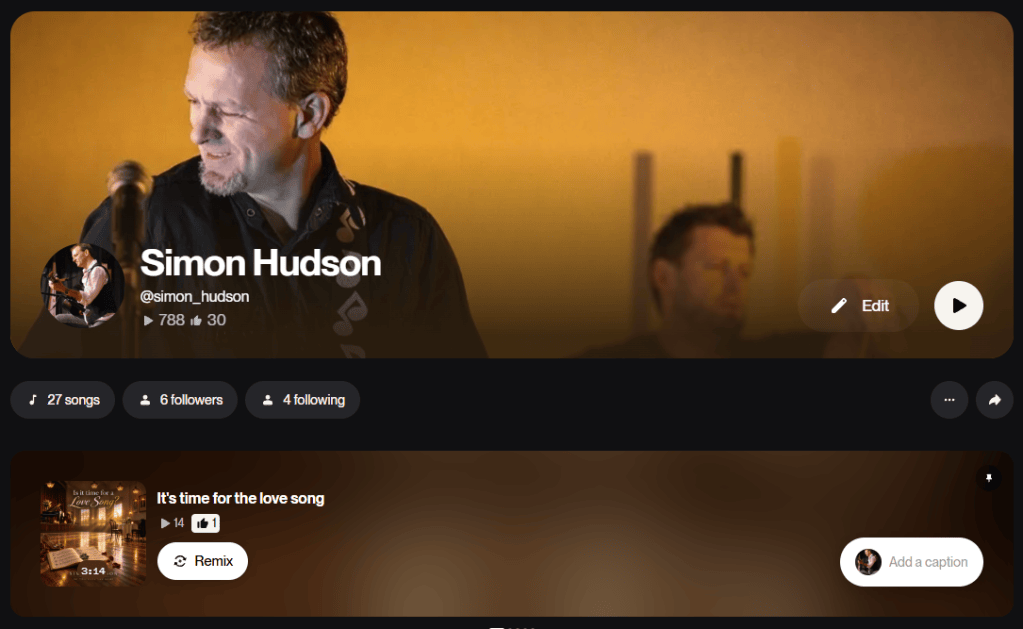
Now keep an eye on my published songs for what might come out of all this
https://suno.com/@simon_hudson
Sources
Suno MCP
https://suno.com/mcp
How do I connect Suno MCP (Beta) to an AI assistant?
https://help.suno.com/en/articles/14551425
Suno MCP Beta release notes
https://suno.com/release-notes/suno-mcp-beta
Build a plugin for a declarative agent from an MCP server – Microsoft Learn
https://learn.microsoft.com/en-us/microsoft-365/copilot/extensibility/build-mcp-plugins
Configure dynamic client registration – Microsoft Learn
https://learn.microsoft.com/en-us/microsoft-365/copilot/extensibility/plugin-authentication-dynamic-client-registration
Confirmation prompts for MCP and API plugins for Microsoft 365 Copilot – Microsoft Learn
https://learn.microsoft.com/en-us/microsoft-365/copilot/extensibility/plugin-confirmation-prompts
Configure remote MCP servers for Microsoft 365 Copilot plugins – Microsoft Learn
https://learn.microsoft.com/en-us/microsoft-365/copilot/extensibility/configure-plugin-mcp-servers
Suno publishes protected-resource metadata at https://api.suno.com/.well-known/oauth-protected-resource
That identifies its OAuth authorisation server as https://studio-api-prod.suno.com/api/v2/external/oauth


