
First steps with Copilot Code
It took me years to stop using Post-it notes.
I am not exaggerating. For a long time my task management system consisted largely of small yellow pieces of paper stuck around my desk, monitor and anything else sufficiently stationary. Mostly ignored or duplicated. I knew there were better ways of doing it. I taught people about Microsoft 365. I understood and actively used Planner. I understood To Do. I just struggled to habituate the digital task list habit.
Eventually I cracked it; trying (and failing) to remember to things on my canal boat projects back at my home workshop was the lever I needed.
Microsoft To Do gradually became part of the way I worked. Personal tasks, Novia Works, Microsoft 365 North, Sustainable Ferriby, the house, the boat, D&D and various other bits of my life ended up in separate lists. It wasn’t a sophisticated project plan, but that was rather the point. To Do did one simple job for me and did it well. Much better than breeding sticky yellow squares and those odd blue and pink rectangular mutants in my secret lab on the top floor.
Annoyingly, now that I have finally become dependent on To Do, Microsoft is deprecating it. Dammit.
Microsoft’s suggested migration path includes a Personal plan in Planner, or moving to another task-management product such as ToDoist. That is perfectly reasonable, and for many people it may be the right answer.
As an honorary Yorkshireman it made me wonder about another option. I resent the extra cost when I pay for both personal and professional M365. I have some Azure credits available to Copilot (thanks Simon and Dylan). Instead of replacing Microsoft’s task application with somebody else’s task application, could I use Copilot Code to build the particular task application I actually wanted? I needed an excuse to play with Code, Garry Trinder had convinced me that it could be simple.
Could I do it, not having done any development for thirty years? It turns out I could.
Building rather than buying the replacement
What interested me most about the exercise was not really the application itself but the process. For most of my career, building software has required crossing a fairly substantial boundary between the person who understands the problem and the person who knows how to build the solution. Sometimes that boundary is a formal requirements document, sometimes it is a project brief, and sometimes it is simply a long conversation with a developer, but there is almost always a translation layer between the two. That’s been my skill in my career; I wrote code for fun decades ago and understand the tech; I also understand business processes and the real world; I have been a useful translation layer.
My original prompt was remarkably short. The second sentence is something Garry recommended as it seems to create better code.
I need to prepare for the deprecation of To Do, so need you to build an app that provides a UI similar to To Do or ToDoist that runs on top of Planner, and able to use different plans to emulate the different categories of tasks I have in To Do.
You are responsible for building the app and will be responsible for maintaining and improving it. Ensure it is responsive (so can be run on a smart phone) and intuitive for someone familiar with To Do and Planner.
What strikes me is not how good the prompt was but how incomplete it was. There was no detailed specification because I didn’t have one. I knew I wanted something that felt like To Do. I knew I wanted Planner underneath because I didn’t want another task silo. Beyond that, I expected the details to emerge through conversation and experimentation.
One of the first things Copilot uncovered was a practical constraint. Planner plans have to live inside Microsoft 365 Groups and therefore inside group-connected SharePoint sites. I don’t have the ability, or indeed the desire, to create a new Microsoft 365 Group every time I want a new task list, so I clarified how I wanted the architecture to work.
Planner plans have to sit in a Microsoft 365 group, which is a group-connected SharePoint site. I can’t create new groups with the permissions I have, so each To Do list becomes a new plan inside one of your existing groups.
Planner would remain the system of record; I wasn’t trying to replace Microsoft’s task infrastructure, I just wanted was a different user experience sitting on top of services that already existed. If Microsoft eventually produce a Planner interface that I like better, my tasks still exist. The application becomes replaceable because the information is not tied to it.
Then I used it
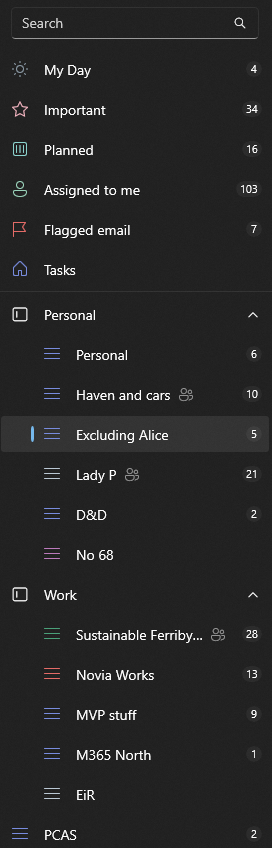
The first version worked. In fact, it worked surprisingly well given how little detail I had provided. I could see my tasks, create new ones, update them and interact with Planner through an interface that was already beginning to feel more familiar than Planner itself. It just wasn’t quite right. I did a compare and contrast and realised that what I missed was the navigation model. I have multiple To Do lists; across personal and ‘work’ roles. To Do handles those in the left-hand navigation and moving between contexts is effortless. My application had tasks and plans, but it didn’t really have the equivalent experience. It was also exposing plans that were technically visible to me but which I didn’t regard as part of my ‘To Do’ personal task-management system.
So I told Copilot Code exactly that.
The one thing that seems to be missing is that To Do has a nice navigation on the left bar that shows each To Do list (which would be a plan in Planner). Our app doesn’t have that listing, or is compromised by showing other plans. Can we correct that, perhaps by filtering out plans that have not been designated as To Do plans
And it did.
I already know that it’s rare that the first prompt for any serious activity is only the start; it’s the iteration and conversation that reveals the true need. That’s been my go-to methodology with AI for 2 years now – discuss what you need rather than try to describe it perfectly upfront. Some might think Agile rather than Waterfall; I think Gordon the Guided Missile. The prompts develop in response to something concrete that we can interact with. I treat my first prompt as a strawman to build upon.
Surprisingly, so far at least, that’s been the extent of the prompting. That third prompt created an app more than good enough to replace To Do. It’s responsive, so runs on a mobile browser (though not as a standalone app yet). It shows just my To Do plans in its left nav rather than every available plan, and groups them into Personal and Work sections, included smart views similar to those found in To Do. It handled the discovery of plans that Planner doesn’t always surface consistently and generally behaved much more like the application I was trying to replace. While writing this I spotted that it hadn’t included sub-tasks/steps in the editing UI, so I have now told it to fox that, and left it running while I finish the article.
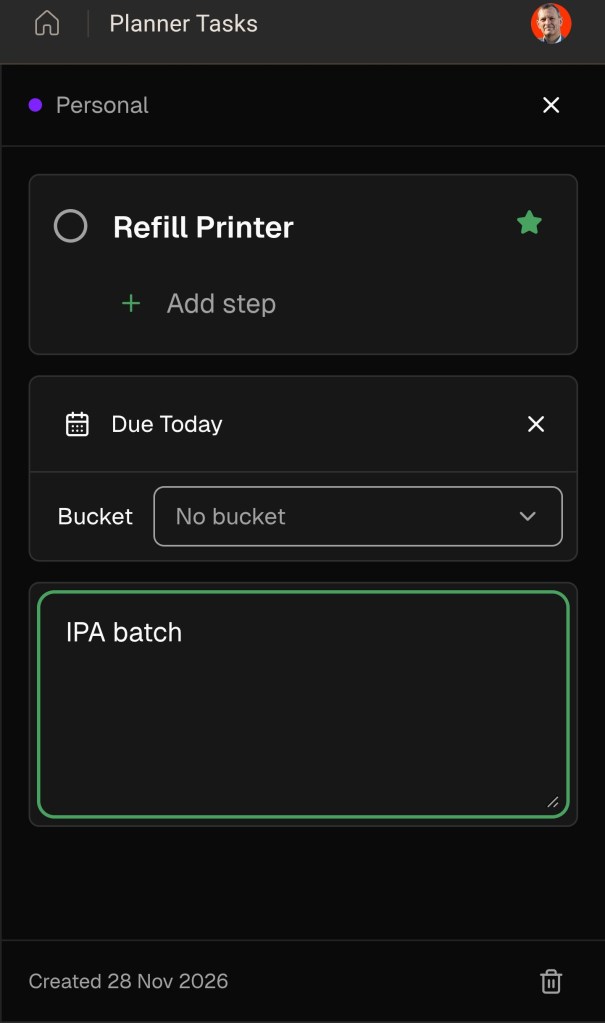
The current version doesn’t expose sub steps. I need that
And here’s what we built (yes, you can click them to make them big enough to read).
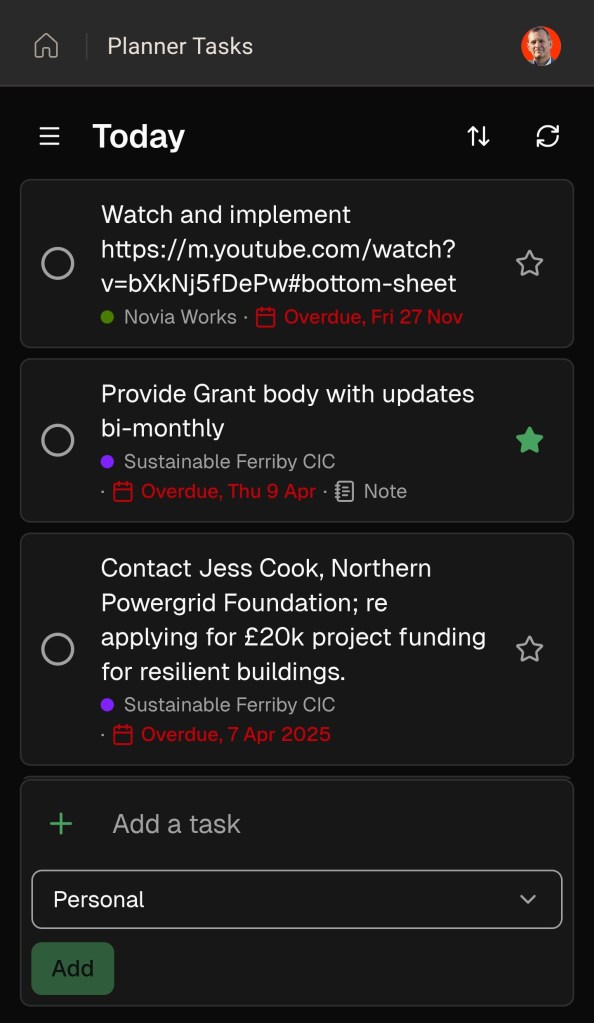
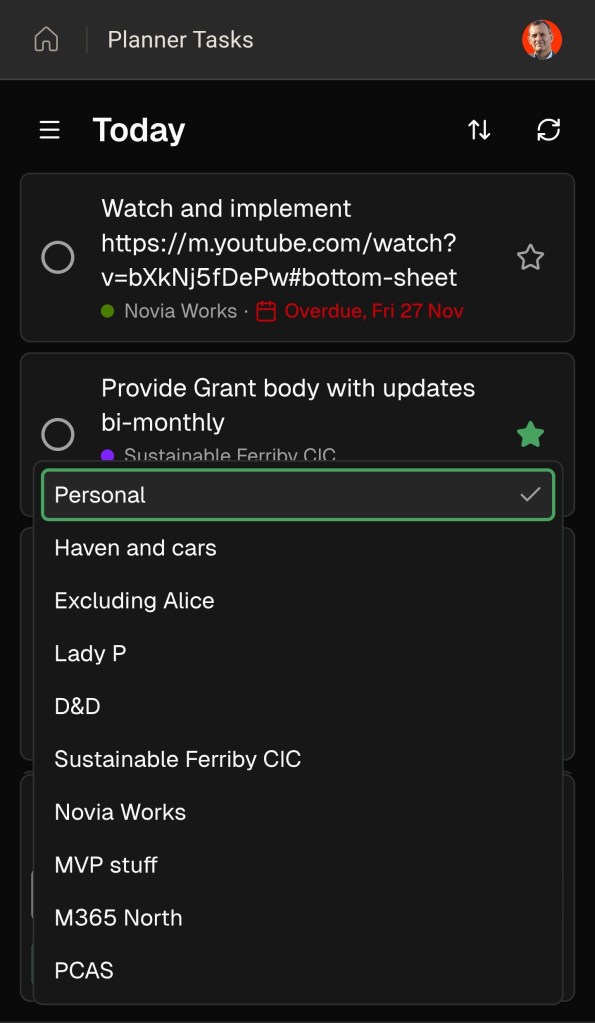
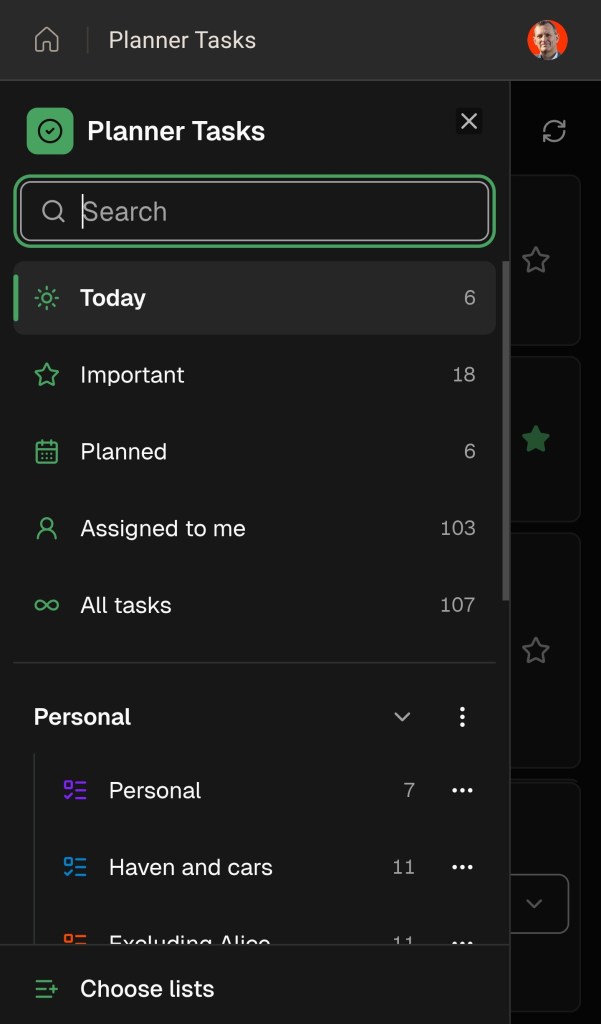
I wondered if there was a single, idealised prompt that somebody else could use to build the same application in one hit (and maybe with fewer tokens). The resulting specification ran to several pages and was dramatically better than my original request. It included mobile behaviour, validation logic, task mappings, smart lists, sorting options, grouping, error handling and a variety of other details that never appeared in my first prompt. Here it is if you want to build you own.
Build me an app called "Planner Tasks" that replaces Microsoft To Do with a To Do / Todoist-style interface running on top of Microsoft Planner, using the Planner connector with my own account. Use live Planner data only, no sample data. It must be responsive (usable one-handed on a smartphone) and feel familiar to To Do and Planner users. A screenshot of my To Do sidebar is attached; match its layout.How Planner maps to To Do:- Each To Do list is a Planner plan. Steps = the task checklist. Notes = the task description. Star/Important = Planner priority "Important" (star sets priority 3, unstar sets 5 "Medium"; treat 1–4 as starred). Due date = Planner due date, saved as 12:00 UTC on the chosen day so it never shifts a day across time zones. Completed = 100% complete.- New tasks go into the plan's first bucket and are assigned to me.Sidebar (like To Do):- Search box at the top (searches all my list plans).- Smart lists: Today (due today or overdue), Important, Planned (grouped Earlier / Today / Tomorrow / This week / Later), Assigned to me (every Planner task assigned to me, from any plan), All tasks. Each shows an open-task count.- Below a divider: ONLY the plans I've chosen as "To Do lists", not every plan I can see. Lists can sit in collapsible named groups (e.g. Personal, Work) or ungrouped, each with an open-task count and a colour.- A "Choose lists" button opens a dialog listing every plan I can access with a tick box; ticking makes it a list. If two plans have the same name, label which one is already a list.- Each list's "…" menu: Move up, Move down, Move to group / New group…, Remove from my lists. Each group's menu: Ungroup lists.- Save these sidebar choices in the browser (plan ids and group names only, never task content). Show a warning if they can't be saved.- Below tablet width the sidebar becomes a slide-out panel opened with a ☰ button.Important technical detail: Planner's "list my plans" call leaves out plans I haven't opened in Planner yet (for example newly created ones). So also read the plans of each Microsoft 365 group that holds one of my lists, merge them with "my plans", and remember a plan's group when I tick it in Choose lists.Task list (main pane):- Title of the current list, a sort menu (creation date, importance, due date, alphabetical) and, in a plan view, a "Buckets" toggle that groups tasks by bucket.- An "Add a task" box at the top; in smart views it includes a picker for which list the task goes into.- Each row: round complete checkbox, title, a second line showing list/bucket, "In progress", steps done (e.g. 2 of 5), due date (red if overdue) and a note icon, then a star toggle.- Completing a task updates instantly, with an Undo toast. Completed tasks sit in a collapsed "Completed" section.Task detail (click a task): an inline side panel on wide screens, a full-screen panel on phones. It has:- editable title and star- steps: add, tick, rename, delete- due-date picker with Today / Tomorrow / Next week shortcuts and clear- bucket picker- notes- delete with confirmationData safety: after every change, read the task back from Planner. If Planner didn't keep the change, undo it on screen and show "Couldn't save". Never log raw connector errors or task content. Show clear loading, empty and error states with Retry.Default view is Today. Use a clean, calm theme with a green accent and support light/dark mode.When it's built, test reading my plans and tasks against my live data. Tell me which actions you could and couldn't verify, then publish it.
Sometimes it feels like we spend a great deal of time talking about prompt engineering as though success depends on constructing the perfect prompt before anything happens; my experience is almost the opposite. Provided the objective is clear and there are examples or existing UI and functionality the AI can access then quality of the result depended far more on recognising what needed improving, building on the strawman, than on being able to describe the finished product in advance.
Migrating existing To Do tasks
Of course, a shiny new application is only useful if it contains the information you actually need. At the time I had 105 incomplete tasks spread across multiple To Do lists, plus a larger number of completed ones. Recreating them manually would have been tedious enough that I probably wouldn’t have bothered. Of course I asked the AI to do it instead, and my migration prompt was every bit as unsophisticated as the application prompt. I also did that in Code; in hindsight it might have been better to use Cowork.
Let’s import all the incomplete items from To Do, which will mean creating some new plans in the appropriate place in SharePoint (or OneDrive if absolutely necessary) and then copying each to do task complete with its subtasks and notes, attachments and due dates. Can you do that?
That was essentially the entire specification. Once again, Copilot responded by asking a few questions, identifying constraints and working through the practical implications. Lists became plans. Tasks became Planner tasks. Steps became Planner checklists. Notes became task descriptions. Attachments were copied into appropriate SharePoint locations and linked back to the resulting tasks. Existing plans were reused where appropriate, new plans were created where necessary, and eventually all 105 incomplete tasks were sitting inside Planner rather than To Do. It didn’t copy across the completed tasks (I don’t need those, but you might, in which case ask it to do that)
Just as with the application itself, I later asked Copilot to produce an idealised migration prompt that somebody else could use. The resulting specification was far more detailed than my original request and included safeguards against duplicate migrations, validation checks, reporting, attachment handling, rerun safety and post-migration verification. It was objectively a much better prompt.
Copy all my incomplete Microsoft To Do tasks into Planner so the Planner Tasks app can replace To Do.1. Read every To Do list (skip "Flagged email") and its incomplete tasks, including steps, notes, due dates, importance, repeat settings and attachments. Show me a count per list before writing anything.2. Planner plans must live in a Microsoft 365 group. List the groups I belong to and ask me which group each To Do list's plan should go into (or which existing plan to use). Warn me that everyone in a group can see its plans. Skip lists with no open tasks unless I say otherwise.3. Create each plan once. Before creating one, check that group's existing plans by name. A new plan can take a while to appear in "my plans", so never re-create a plan just because it isn't listed yet.4. For each task, create the Planner task assigned to me with: - the title - steps as checklist items (ticked steps stay ticked, original order kept) - notes as the description - due date (keep the same calendar day, stored at 12:00 UTC) - starred/high importance as priority Important Planner limits: 20 checklist items and 100 characters per item. Put anything longer or extra into the notes. For repeating tasks, add a line in the notes saying how it repeated, because Planner can't repeat tasks this way. Reminders can't be copied; tell me which tasks had them.5. Upload each attachment to a "To Do attachments/<list name>" folder in that group's SharePoint document library and add it to the task as a link.6. Make it safe to re-run: skip any task whose title already exists in the target plan.7. Afterwards, read every new task back. Confirm the step count, due date, priority and notes match the original. Report per list: created, skipped, failed.8. Set up the app's default "To Do lists" sidebar to show these plans, grouped the same way as in my To Do.Don't change or delete anything in To Do.
What did it cost?
The complete exercise cost approximately £10 in Copilot Credits.
The exact figure isn’t especially important; another application, model or set of interactions will inevitably produce a different result; it’s the order of magnitude that matters. Historically, the response to a problem like this would have been one of three things: Buy another product; Put up with the problem; Commission some development work. The first option introduces another platform and another subscription. The second leaves the problem unsolved. The third generally costs far more than the problem is worth.
Now there is a fourth option: Spend a few pounds, build something, see if it works and decide whether it is worth taking further.
Not every experiment will succeed, but when the cost of testing an idea falls from thousands of pounds to tens of pounds, the number of ideas worth testing increases dramatically. That alone may be one of the most significant consequences of tools such as Copilot Code. Just beware Jevon’s Paradox
Why not just use Todoist?
At this point some people will quite reasonably ask why I bothered when Todoist already exists. It’s a mature product with a larger feature set, a dedicated development team and a well-established user base. If your objective is simply to find a replacement for To Do, then installing Todoist and moving on with your life is a perfectly sensible decision.
My objective was slightly different. I didn’t really need another task-management platform because I already had one, Planner, which sits inside Microsoft 365. I actively wanted to retain the platform, but needed a To Do interface. My information remains inside Microsoft 365 (and so can be used by Copilot), it integrates into SharePoint sites etc. The new application becomes a layer over the top rather than a destination in its own right, and I retain the freedom to change it, improve it or abandon it entirely without needing to move the underlying information anywhere else.
Pros, cons and risks of Code-built applications
This article isn’t really about building a To Do replacement. For years we have treated applications as durable assets and data as something that lives inside them. If we wanted a different experience we generally had to move the data, because the application and the information were tightly coupled. That coupling has shaped much of enterprise software for decades. Copilot Code hints at a different model.
Pros
My tasks live in Planner. My files live in SharePoint. My permissions, compliance controls and governance remain within Microsoft 365. The application increasingly feels like the temporary component rather than the permanent one. There are obvious advantages to this approach. Subject matter experts can describe problems directly rather than translating them into lengthy requirements documents. Small ideas become economically viable, while existing platforms remain systems of record while specialised experiences are built on top of them. Organisations (including nano companies like mine) can experiment more freely because the cost of experimentation is lower.
Risks
There are also risks. AI-generated code is still code; security still matters enormously; I can’t ignore Governance. Maintenance and technical debt remain a thing or two. The ease of creating software does not eliminate the need for software discipline and, in some respects, may make it more important because more people will find themselves creating applications that others come to depend on. The danger is not that people build software, but that they forget they have built software that needs lifecycle management.
Cons
It does cost a few credits every time I use it. I say that, but actually Microsoft currently charges 0.1 Copilot Credit per API call for the hosting/runtime element. AI features, agents or Work IQ calls would be additional, but this straightforward task app doesn’t (yet) need those. If I use it twice a day, every day, that works out at 73 Copilot Credits/year; a not terrifying cost of ~£0.60
If I am still using it in five years’ time then I will have spent about £13, vs Todoist Pro at £5/month; that represents decent value. If I replace it with something better in six months, that may be equally successful because it will have informed my decision on the real asset; besides the value was never the in application, it’s in the information.
What next?
Most organisations are full of awkward little problems that are too complicated for a spreadsheet but too small to justify a traditional software project. They persist for years because nobody can make a sensible business case for spending thousands of pounds solving something that is merely irritating rather than transformational.
I’ve struggled a bit, wondering what else to build with this new superpower. Obviously, I therefore asked Copilot, which knows a thing or two about me at this point, for some thoughts:
– A personal Microsoft 365 dashboard that surfaces only the information relevant to an individual.
– A project cockpit that combines Planner, SharePoint and Outlook into a single focused experience.
– A governance dashboard that helps site owners tackle stale content and missing metadata.
– A knowledge-refinery application that tracks information as it moves from raw source material to authoritative organisational knowledge.
– A lightweight event-management platform built on top of existing Microsoft 365 services rather than introducing yet another product.
None of these ideas is revolutionary, but they are interesting and a stepping stone to what I really might need.
New ways of thinking
As I reflect on this experiment, the interesting thing I built wasn’t the application itself. Instead, I built evidence for a different way of thinking about software. My replacement for To Do cost roughly the same as a cheap lunch (and only slightly more than a beer).
For decades we have adapted our processes to suit software because software was expensive to create and difficult to change. We selected applications, trained people to use them and then lived with their limitations because replacing them was costly. Copilot Code suggests that relationship may be starting to reverse.
Keep the data in governed platforms. Keep identity, permissions and compliance where they belong. Keep information independent of any particular user experience. Then generate applications around that information as requirements evolve, improving them, replacing them or discarding them entirely when something better comes along.
Which reminds me to put in an almost mandatory Star Trek reference. I always wondered how the crew cold be so rapid and efficient in doing the impossibly complex job of operating a starship. Part of the answer is that they are probably running their own, personalised interfaces; optimised for their way of working, mode of thinking, handedness etc. Perhaps this level of on-demand UI has a bigger role to play in issues of Diversity and Inclusion on this planet, right now. Change the application instead of the users.


