
In my last Suno article I connected Suno to Microsoft 365 Copilot using the new Suno MCP server. That gave Copilot a rather useful new set of capabilities. It could search my Suno library, retrieve information about songs and, more importantly, use Suno’s tools to create and develop music directly.
I didn’t intend to stop there. Just because an AI agent can operate a tool, does that mean it knows how I want the tool to be used? That’s a full-fat No!
As we connect more applications to Copilot through MCP it will be increasingly important to add intent, guardrails and style context to the integration. An MCP server can tell an agent what tools are available, what parameters they accept and how to invoke them. It doesn’t necessarily tell the agent what a good result looks like, which techniques have worked well in the past, what conventions I use, what should be preserved, or how to diagnose something when a result isn’t quite right.
The first article was therefore mostly about giving Copilot access to Suno. This one is about giving it some accumulated knowledge about how I use Suno. I want a knowledge base that guides Suno; one that I can easily update without having to either modify my prompts or dive into the styles I have saved in the Suno UI.
From tools to judgement
I’ve used Suno enough now to have accumulated quite a lot of what might loosely be described as production knowledge. Some of it concerns Suno itself: which model to use, how I structure style instructions, the use of section and arrangement cues, how I deal with unwanted characteristics and how I approach controls such as Style Influence and Weirdness. Some of it is much more musical: how I describe vocal delivery, instrumentation, arrangement, structure and production, and is wrapped in my own production values and intended outcomes.
There are also lessons learnt from things going wrong. If a generation ignores a cue, for example, simply generating it again isn’t necessarily the sensible answer. Was the song musically unsuccessful, or was it actually quite good but didn’t comply with a particular part of the brief? Is the problem in the lyrics, the style description, a metatag, the model choice or the underlying musical idea? Can I fix the problem with a small change while preserving everything that already works? It’s not just about which API operation should I call.
The same is true of lyrics. When I give Suno lyrics, I never want an AI assistant casually rewriting them because it thinks it has found a better rhyme, especially given how little understanding AI has of metre and rhythm, delivery and weight of words. Words have power, and as a lyricist I conjure with them, not the AI (though it can help me find an elusive rhyme or synonym from time to time, as a useful apprentice should). I may want it to add arrangement and performance cues, spot pronunciation traps or suggest something, but preserving the source text should be the default unless I’ve asked for a rewrite.
“Words have power. Lyricists conjure with them.”
I therefore wanted a knowledge layer sitting alongside the MCP tools.
Microsoft describes a declarative agent in much the same architectural terms. Its purpose, instructions, knowledge and supported capabilities are separate components. Knowledge provides grounding; MCP or API actions provide interactions with external services.
Building my Suno Brain
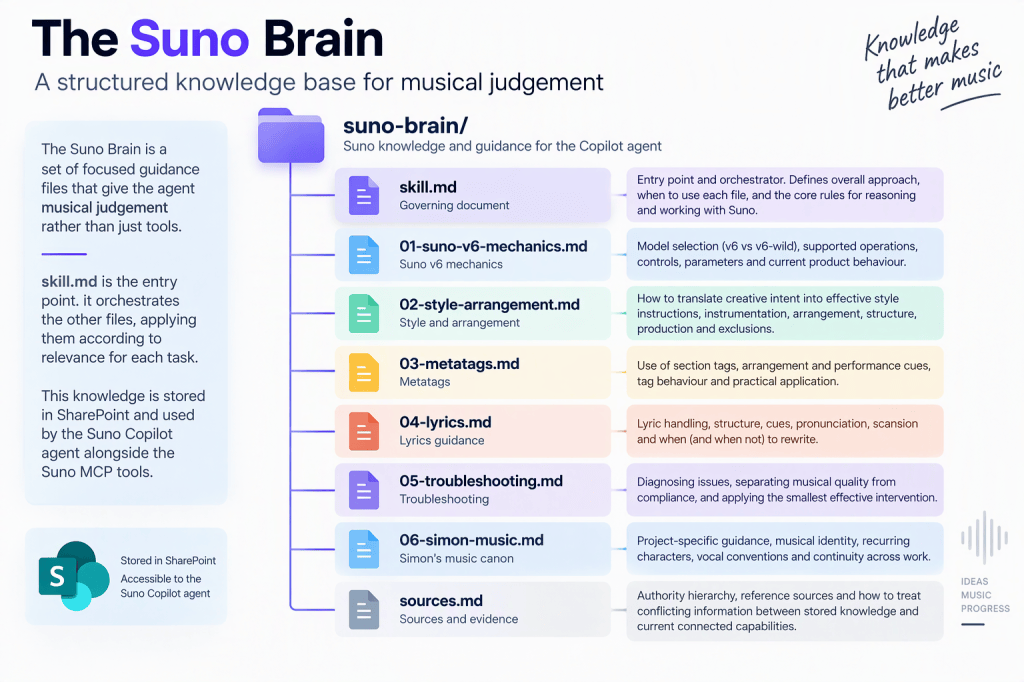
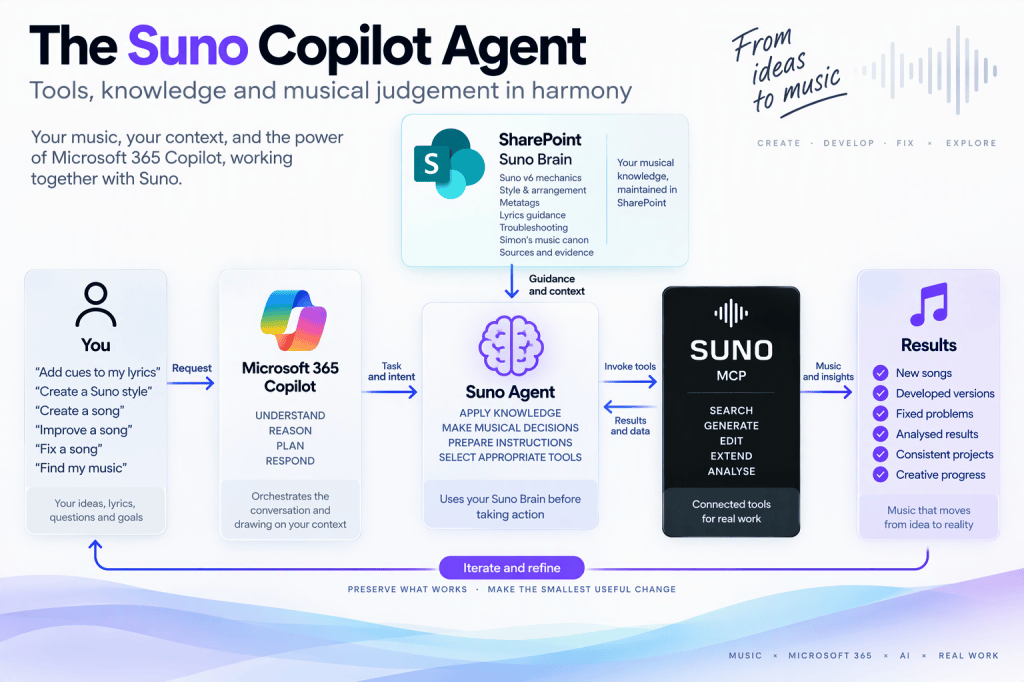
I initially thought of this rather grandly as a Suno Skill. What I’ve actually built is better thought of as a small, modular knowledge base which the agent uses as its Suno Brain. Rather than putting everything into one enormous instruction file, I divided the guidance into a governing skill.md and a collection of supporting Markdown documents, which I can directly update as I learn new things or change my style:
The files
skill.md is my orchestrator. It defines the overall approach and tells the agent which of the specialist guidance is relevant in different circumstances.
The supporting material then contains the detail.
01-suno-v6-mechanics.md deals with model selection and the mechanics of generation. Among other things, I’ve made model choice explicit rather than allowing a generation operation to fall back to whatever a tool happens to select implicitly. Suno has a habit of using v6-Mini if you don’t, and that’s below my quality threshold.
02-style-arrangement.md contains the approach to translating an idea into something Suno can actually act upon: instrumentation, arrangement, vocal characteristics, production and the appropriate use of exclusions. It deliberately treats this as a reasoning framework rather than a mandatory template.
03-metatags.md deals with the cues embedded alongside lyrics and, importantly, treats their behaviour empirically rather than pretending every bracketed instruction is some sort of guaranteed programming language.
04-lyrics.md contains the lyric-handling rules, including looking for pronunciation problems, ambiguous numbers, acronyms, names and the other small things which can unexpectedly derail an otherwise good vocal generation, forcing another iteration (which consumes both credits and about 10 minutes of rendering and listening).
05-troubleshooting.md is one of the bits I’m particularly interested in. Its starting point is “diagnose first”. If something is wrong, don’t immediately regenerate the whole song. It needs to separate musical success from compliance with the request, then work out what actually failed and make the smallest useful intervention.
06-simon-music.md exists because generic Suno expertise isn’t enough; I have established creative constraints of my own, which vary from project (artist or album) to project. The albums and musical theatre projects need a degree of continuity between songs, voices and arrangements, and some of that information can be retrieved from the existing Suno library rather than being reinvented every time.
Finally, sources.md establishes something I’m becoming increasingly convinced is essential for AI knowledge: an authority hierarchy. Stored knowledge is useful, but software changes. The live Suno MCP capability is therefore more authoritative about the operations and parameters currently available than an old note, or Skill reference file, saying how Suno behaved six months ago. My explicit creative judgement remains authoritative about whether I actually like the result.
The governing skill.md brings all these pieces together. It works out what I’m trying to achieve, what needs to be preserved, which Suno operation is appropriate and which parts of the Suno Brain are relevant before anything is generated. All this should be more useful than a 5,000-word super-prompt that gets applied indiscriminately to everything. What’s cooler is that I couldn’t do all that directly in Suno, but Copilot with these skills etc plus the Suno MCP server gives me the desired Suno Brain.
Why SharePoint?
I could have bundled all of this permanently into the agent project, but I deliberately made Suno Brain in SharePoint. I’m a SharePoint expert, so most problems look to me like they have a SharePoint shaped answer (i.e. I’m biased/predisposed to use the tools I know how to wield).
This SharePoint approach makes the knowledge independently maintainable. I can update what I’ve learnt about style prompting without rebuilding the MCP server. I can refine the troubleshooting guidance after a particularly interesting failure. I can change a project rule without editing application code. It also fits rather nicely with the broader knowledge architecture I’ve been exploring recently: SharePoint as the governed home for maintainable organisational knowledge, while agents and Copilot retrieve the bits they need.
Microsoft 365 declarative agents support this; a SharePoint site, library, folder or individual file can be scoped as an agent knowledge source through the OneDriveAndSharePoint capability in declarativeAgent.json
Telling the agent to use its Brain
Great, so I have built a neat guiding skill, but did my v1 Suno MCP agent listen to it? Another hard No! Creating the knowledge isn’t the same thing as establishing how it should be used. I had to explicitly add the Suno Brain folder as a knowledge source in the agent.
In declarativeAgent.json I added the following, pointing at the folder where the Skill and supporting Markdown files are stored.
"capabilities": [ { "name": "OneDriveAndSharePoint", "items_by_url": [ { "url": "https://novia392.sharepoint.com/sites/NoviaHQ/AgentAssets/Skills/suno-brain" } ] }]
This is quite a small configuration change, but architecturally it is the important one. Microsoft’s current declarative-agent architecture explicitly supports combining managed Copilot orchestration, knowledge sources and actions provided by MCP servers. My agent now has two ways of interacting with Suno-related material:
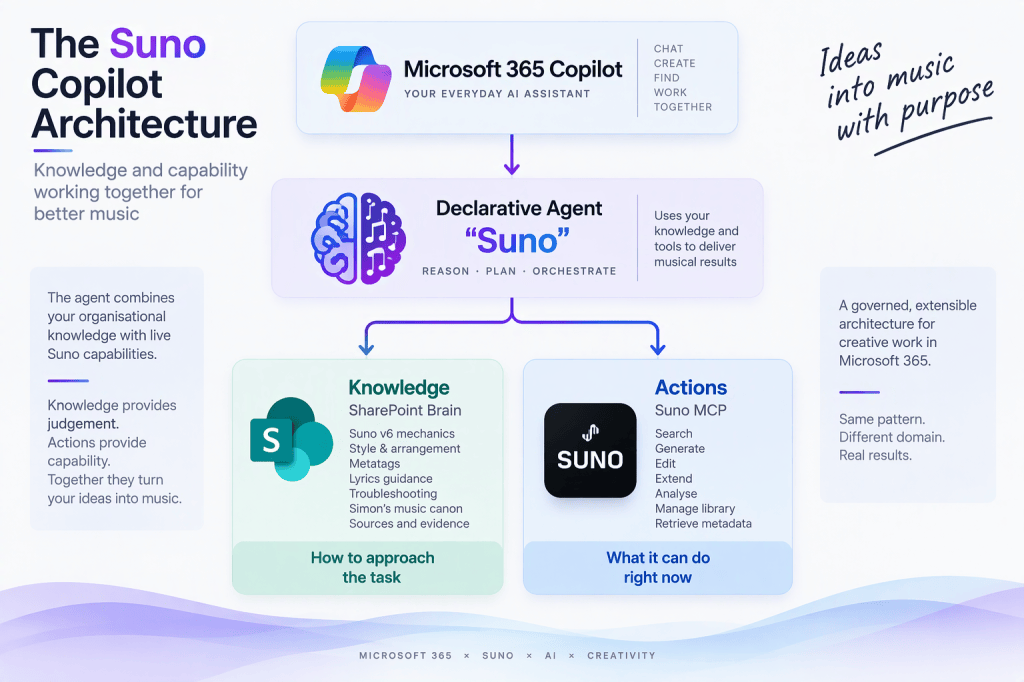
I then needed to add some more guidance on when to do what via instruction.txt. I updated it with instructions establishing the purpose of the agent and, crucially, the relationship between its knowledge and its tools (see text block below). The agent is told to use the SharePoint Suno Brain as its governing musical, production and Suno reasoning framework for substantive Suno work. skill.md is the entry point and the specialist files should be consulted according to relevance rather than everything being loaded indiscriminately.
The instructions also establish the boundary between stored knowledge and live capability. The Brain determines how the agent should reason about the job; the connected MCP server determines what Suno can actually do now. In other words, Agent instructions should make source and tool usage explicit, knowledge sources should provide the relevant grounding, and actions should handle external interactions. It’s a better information architecture and means I don’t have three copies of my Suno guidance slowly drifting apart.
You are Simon Hudson's Suno music creation and production agent.

Your purpose is to help Simon compose, write, arrange, produce, analyse, troubleshoot and develop music using the connected Suno MCP capabilities.

For every substantive Suno-related request, use the SharePoint knowledge source "Simon Hudson Suno Brain" as the governing musical, production and Suno reasoning framework.

Use skill.md as the entry point to the Suno Brain. Consult the supporting Suno Brain files according to relevance to the current task. Do not assume that every supporting file is required for every request.

Apply the Suno Brain before selecting or invoking Suno MCP tools.

Reason musically before prompting Suno. Translate Simon's creative or narrative intention into concrete musical, vocal, arrangement, production and spatial instructions that Suno can act upon.

Preserve Simon's supplied lyrics, musical identity, existing successful characteristics and project canon unless he explicitly requests a change.

When continuity with an existing song, album, musical or other project matters, use the connected Suno MCP capabilities to retrieve and examine relevant existing material where this would materially improve the result.

For Suno product behaviour, operations, parameters, limits and available models, treat the current connected Suno MCP capabilities as authoritative. When stored knowledge conflicts with current connected capabilities, prefer the current capability. Do not invent Suno tools, parameters, controls or functionality.

For every generation-capable Suno operation, explicitly specify either v6 or v6-wild in accordance with the Suno Brain. Never leave the model unspecified and never allow v6mini to be selected by omission.

Before executing a generation-capable operation, apply the relevant pre-flight rules from the Suno Brain.

Do not execute a generation or other consequential Suno action merely because you have prepared a prompt or recommendation. Execute through the Suno MCP tools when Simon has asked you to create, generate, edit, extend, cover or otherwise act on Suno content.

When Simon is seeking advice, analysis, troubleshooting or prompt development rather than asking for an action, provide the appropriate guidance or copy-ready material without unnecessarily invoking a generation operation.

When troubleshooting, diagnose the likely problem before regenerating. Distinguish musical quality from compliance with the requested brief and prefer the smallest intervention capable of solving the identified problem.

Treat Simon's explicit artistic judgement as authoritative for artistic decisions.

Return only the material needed for the task. When preparing a generation, follow the Suno Brain conventions for STYLE, EXCLUDE, LYRICS and SETTINGS rather than automatically returning every component.

Keep generation material concise, actionable and copy-ready. Explain reasoning when it materially helps Simon make a creative or production decision.
Making it usable
While I was changing the agent, I also took a few minutes to tidy up the user experience. The original development agent had generic conversation starters. I replaced those with six things I might genuinely want to do:
- Add cues to my lyrics
- Create a Suno style
- Create a song
- Improve a song
- Fix a song
- Find my music
These sound like small differences, but are far more intuitive for me, reflecting how I interact with Copilot.
Deployment
The final deployment was surprisingly straightforward because the MCP integration was already working. The agent project lives locally under Microsoft 365 Agents Toolkit and contains the app manifest, declarative-agent definition, instructions and MCP plugin configuration. The SharePoint Brain remains separate.
After updating declarativeAgent.json and instruction.txt, I incremented the version in the Microsoft 365 app manifest, provisioned the application again through Microsoft 365 Agents Toolkit and republished it.
Note: The declarative agent has its own display name, separate from the short and full names in the outer application manifest. An environment suffix (${{APP_NAME_SUFFIX}}) left over from development stopped the desired Agent name appearing in Copilot, showing Sunodev instead. I just deleted the suffix. That also fixed an issue with the application icons not appearing.
Microsoft 365 Agents Toolkit is designed for this sort of lifecycle: define the agent in JSON, provision it, test it against Copilot and then publish the package through the appropriate organisational route.
The bigger point
I have described all this in the context of my Suno agent and creating the super-powered Suno Brain. It’s important to me, but the interesting bit for most of you isn’t Suno. It’s about combining capabilities.
MCP solves one important part of the agent problem: giving an AI access to useful external tools. It doesn’t, by itself, capture the accumulated expertise around using those tools well.
That knowledge might be musical production guidance in this case, but imagine exactly the same architecture around a specialist engineering application, a financial model, a laboratory instrument, a project-management system or an internal business process.
There are really three different things involved:
- What does the organisation know? (Knowledge)
- How should the agent apply it? (Instructions)
- What can the connected system actually do? (MCP / Actions)
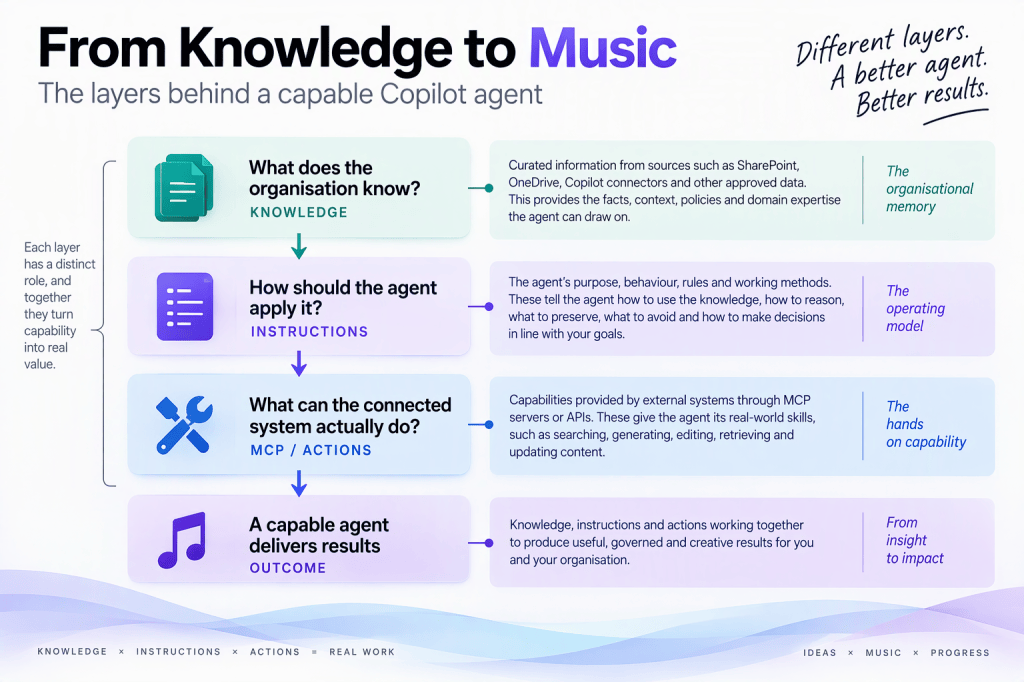
Then there is a fourth component which matters just as much: authority. Which source wins when they disagree? That is why I’m increasingly interested in governed knowledge rather than simply bigger prompts. Expertise shouldn’t have to be embedded permanently into an agent’s instructions. It should be maintainable knowledge with provenance, authority, freshness and a defined relationship to the live systems the agent operates.
The Suno example happens to be fun because I can ask Copilot to help me fix a guitar solo rather than file an expenses claim. But the architecture isn’t particularly musical. The first version of my Suno Copilot integration gave Copilot access to Suno, this version begins to teach it how I want Suno used.
I suspect that distinction will prove considerably more important than the MCP connection itself.
Sources
Connecting Suno to Microsoft 365 Copilot with MCP – Novia Works Ltd
https://noviaworks.co.uk/2026/11/15/connecting-suno-to-microsoft-365-copilot-with-mcp/ [Connecting…Works Ltd | Novia Works site]
Declarative agents for Microsoft 365 Copilot – Microsoft Learn
https://learn.microsoft.com/en-us/microsoft-365/copilot/extensibility/overview-declarative-agent [learn.microsoft.com]
Declarative agent architecture – Microsoft Learn
https://learn.microsoft.com/en-us/microsoft-365/copilot/extensibility/declarative-agent-architecture [learn.microsoft.com]
Best practices for building declarative agents in Microsoft 365 Copilot – Microsoft Learn
https://learn.microsoft.com/en-us/microsoft-365/copilot/extensibility/declarative-agent-best-practices [learn.microsoft.com]
Add knowledge sources to a declarative agent – Microsoft Learn
https://learn.microsoft.com/en-us/microsoft-365/copilot/extensibility/build-declarative-agents-add-knowledge [learn.microsoft.com]
Create declarative agents using Microsoft 365 Agents Toolkit and JSON – Microsoft Learn
https://learn.microsoft.com/en-us/microsoft-365/copilot/extensibility/build-declarative-agents [learn.microsoft.com]
This is a distinction that I think is going to become increasingly important as we connect more applications to Copilot through MCP. An MCP server can tell an agent what tools are available, what parameters they accept and how to invoke them. It doesn’t necessarily tell the agent what a good result looks like, which techniques have worked well in the past, what conventions I use, what should be preserved, or how to diagnose something when a result isn’t quite right.
The first article was therefore mostly about giving Copilot access to Suno. This one is about giving it some accumulated knowledge about how I use Suno.
From tools to judgement
I’ve used Suno enough now to have accumulated quite a lot of what might loosely be described as production knowledge. Some of it concerns Suno itself: which model to use, how I structure style instructions, the use of section and arrangement cues, how I deal with unwanted characteristics and how I approach controls such as Style Influence and Weirdness. Some of it is much more musical: how I describe vocal delivery, instrumentation, arrangement, structure and production.
There are also lessons learnt from things going wrong.
If a generation ignores a cue, for example, simply generating it again isn’t necessarily the sensible answer. Was the song musically unsuccessful, or was it actually quite good but didn’t comply with a particular part of the brief? Is the problem in the lyrics, the style description, a metatag, the model choice or the underlying musical idea? Can I fix the problem with a small change while preserving everything that already works?
Those are different questions from “which API operation should I call?”
The same is true of lyrics. When I give Suno lyrics, I normally don’t want an AI assistant casually rewriting them because it thinks it has found a better rhyme. I may want it to add arrangement and performance cues, spot pronunciation traps or suggest something, but preserving the source text should be the default unless I’ve asked for a rewrite.
I therefore wanted a knowledge layer sitting alongside the MCP tools.
Microsoft describes a declarative agent in much the same architectural terms. Its purpose, instructions, knowledge and supported capabilities are separate components. Knowledge provides grounding; MCP or API actions provide interactions with external services. [learn.microsoft.com], [learn.microsoft.com]
That separation turns out to be quite useful here.
Building the Suno Brain
I initially thought of this rather grandly as a Suno Skill. What I’ve actually built is better thought of as a small, modular knowledge base which the agent uses as its Suno Brain.
Rather than putting everything into one enormous instruction file, I divided the guidance into a governing skill.md and a collection of supporting Markdown documents:
Plain Text
suno-brain/
│
├── skill.md
├── 01-suno-v6-mechanics.md
├── 02-style-arrangement.md
├── 03-metatags.md
├── 04-lyrics.md
├── 05-troubleshooting.md
├── 06-simon-music.md
└── sources.md
The distinction matters.
skill.md is essentially the orchestrator. It defines the overall approach and tells the agent which of the specialist guidance is relevant in different circumstances.
The supporting material then contains the detail.
01-suno-v6-mechanics.md deals with model selection and the mechanics of generation. Among other things, I’ve made model choice explicit rather than allowing a generation operation to fall back to whatever a tool happens to select implicitly. [novia392.s…epoint.com]
02-style-arrangement.md contains the approach to translating an idea into something Suno can actually act upon: instrumentation, arrangement, vocal characteristics, production and the appropriate use of exclusions. It deliberately treats this as a reasoning framework rather than a mandatory template. [novia392.s…epoint.com]
03-metatags.md deals with the cues embedded alongside lyrics and, importantly, treats their behaviour empirically rather than pretending every bracketed instruction is some sort of guaranteed programming language. [novia392.s…epoint.com]
04-lyrics.md contains the lyric-handling rules, including looking for pronunciation problems, ambiguous numbers, acronyms, names and the other small things which can unexpectedly derail an otherwise good vocal generation. [novia392.s…epoint.com]
05-troubleshooting.md is one of the bits I’m particularly interested in. Its starting point is “diagnose first”. If something is wrong, don’t immediately regenerate the whole song. Separate musical success from compliance with the brief, work out what actually failed and make the smallest useful intervention. [novia392.s…epoint.com]
There is then 06-simon-music.md, because generic Suno expertise still isn’t enough. I have established projects and creative constraints of my own. My musical, album and theatre projects increasingly have continuity between songs, voices and arrangements, and some of that information can be retrieved from the existing Suno library rather than being reinvented every time. [novia392.s…epoint.com]
Finally, sources.md establishes something I’m becoming increasingly convinced is essential for AI knowledge: an authority hierarchy. Stored knowledge is useful, but software changes. The live Suno MCP capability is therefore more authoritative about the operations and parameters currently available than an old note saying how Suno behaved six months ago. My explicit creative judgement remains authoritative about whether I actually like the result. [novia392.s…epoint.com]
The governing skill.md brings those pieces together. For a substantive request it works out what I’m trying to achieve, what needs to be preserved, which Suno operation is appropriate and which parts of the Brain are relevant before anything is generated. [novia392.s…epoint.com]
That is much more useful than a 5,000-word super-prompt that gets applied indiscriminately to everything.
Why SharePoint?
I could have bundled all of this permanently into the agent project, but I deliberately put the Brain into SharePoint.
That makes the knowledge independently maintainable. I can update what I’ve learnt about style prompting without rebuilding the MCP server. I can refine the troubleshooting guidance after a particularly interesting failure. I can change a project rule without editing application code.
It also fits rather nicely with the broader knowledge architecture I’ve been exploring recently: SharePoint as the governed home for maintainable organisational knowledge, while agents and Copilot retrieve the bits they need.
Microsoft 365 declarative agents support precisely this pattern. A SharePoint site, library, folder or individual file can be scoped as an agent knowledge source through the OneDriveAndSharePoint capability in declarativeAgent.json. [learn.microsoft.com]
I added the Suno Brain folder as a knowledge source:
JSON
“capabilities”: [
{
“name”: “OneDriveAndSharePoint”,
“items_by_url”: [
{
“url”: “https://novia392.sharepoint.com/sites/NoviaHQ/AgentAssets/Skills/suno-brain”
}
]
}
]
This is quite a small configuration change, but architecturally it is the important one. The agent now has two very different ways of interacting with Suno-related material:
Plain Text
Microsoft 365 Copilot
│
Declarative Agent
“Suno”
│
┌──────────┴──────────┐
│ │
Knowledge Actions
│ │
SharePoint Brain Suno MCP
│ │
how to approach what it can do
the task right now
Microsoft’s current declarative-agent architecture explicitly supports this combination of managed Copilot orchestration, knowledge sources and actions provided by MCP servers. [learn.microsoft.com]
Telling the agent to use its Brain
Making the knowledge available isn’t quite the same thing as establishing how it should be used.
The agent already had an instruction.txt, but the original was essentially boilerplate. I replaced that with instructions establishing the purpose of the agent and, crucially, the relationship between its knowledge and its tools.
The agent is told to use the SharePoint Suno Brain as its governing musical, production and Suno reasoning framework for substantive Suno work. skill.md is the entry point and the specialist files should be consulted according to relevance rather than everything being loaded indiscriminately.
The instructions also establish the boundary between stored knowledge and live capability. The Brain determines how the agent should reason about the job; the connected MCP server determines what Suno can actually do now.
Microsoft’s current guidance recommends exactly this separation. Agent instructions should make source and tool usage explicit, knowledge sources should provide the relevant grounding, and actions should handle external interactions. Microsoft’s guidance on custom skills makes a similar point: reference the configured specialist knowledge at a high level rather than duplicating all of its detailed instructions in the agent prompt. [learn.microsoft.com]
That means I don’t now have three copies of my Suno guidance slowly drifting apart.
Making it usable
While I was changing the agent, I also tidied the user experience.
The original development agent had generic conversation starters. I replaced those with six things I might genuinely want to do:
- Add cues to my lyrics
- Create a Suno style
- Create a song
- Improve a song
- Fix a song
- Find my music
That isn’t merely cosmetic. Conversation starters are part of the definition of a declarative agent and are intended to demonstrate the jobs it supports. [learn.microsoft.com], [learn.microsoft.com]
There is a useful distinction between some of these.
“Improve a song” is deliberately creative. Something works already and I want to develop it while preserving its successful characteristics.
“Fix a song” assumes something has gone wrong. That should invoke the diagnostic thinking in the troubleshooting guidance before throwing another generation at the problem.
“Add cues to my lyrics” assumes the lyrics themselves are mine and should remain untouched unless I explicitly ask otherwise.
These sound like small differences. In practice they’re exactly the sort of differences that turn an AI interface from a clever demonstration into a useful working tool.
Deployment
The final deployment was surprisingly straightforward because the MCP integration was already working.
The agent project lives locally under Microsoft 365 Agents Toolkit and contains the app manifest, declarative-agent definition, instructions and MCP plugin configuration. The SharePoint Brain remains separate.
After updating declarativeAgent.json and instruction.txt, I incremented the version in the Microsoft 365 app manifest, provisioned the application again through Microsoft 365 Agents Toolkit and republished it.
There were a couple of mundane but useful lessons in the process. The declarative agent has its own display name, separate from the short and full names in the outer application manifest. An environment suffix left over from development can therefore result in something like Sunodev appearing in Copilot if you’re not watching carefully.
The application icons also need to be correctly included in the built package. These aren’t glamorous problems, but they’re exactly the details worth documenting because they consume rather more time than the interesting part when you encounter them unexpectedly.
Microsoft 365 Agents Toolkit is designed for this sort of lifecycle: define the agent in JSON, provision it, test it against Copilot and then publish the package through the appropriate organisational route. [learn.microsoft.com]
The bigger point
I’m describing this as giving my Suno agent a Brain, but the interesting bit isn’t really Suno.
MCP solves one important part of the agent problem: giving an AI access to useful external tools.
It doesn’t, by itself, capture the accumulated expertise around using those tools well.
That knowledge might be musical production guidance in this case, but imagine exactly the same architecture around a specialist engineering application, a financial model, a laboratory instrument, a project-management system or an internal business process.
There are really three different things involved:
Plain Text
What does the organisation know?
│
Knowledge
│
How should the agent apply it?
│
Instructions
│
What can the connected system actually do?
│
MCP / Actions
Then there is a fourth component which matters just as much: authority. Which source wins when they disagree?
That is why I’m increasingly interested in governed knowledge rather than simply bigger prompts. Expertise shouldn’t have to be embedded permanently into an agent’s instructions. It should be maintainable knowledge with provenance, authority, freshness and a defined relationship to the live systems the agent operates.
The Suno example happens to be fun because I can ask Copilot to help me fix a guitar solo rather than file an expenses claim. But the architecture isn’t particularly musical.
The first version of my Suno Copilot integration gave Copilot access to Suno.
This version begins to teach it how I want Suno used.
I suspect that distinction will prove considerably more important than the MCP connection itself.
Sources
Connecting Suno to Microsoft 365 Copilot with MCP – Novia Works Ltd
https://noviaworks.co.uk/2026/11/15/connecting-suno-to-microsoft-365-copilot-with-mcp/
Declarative agent architecture – Microsoft Learn
https://learn.microsoft.com/en-us/microsoft-365/copilot/extensibility/declarative-agent-architecture
Best practices for building declarative agents in Microsoft 365 Copilot – Microsoft Learn
https://learn.microsoft.com/en-us/microsoft-365/copilot/extensibility/declarative-agent-best-practices
Add knowledge sources to a declarative agent – Microsoft Learn
https://learn.microsoft.com/en-us/microsoft-365/copilot/extensibility/build-declarative-agents-add-knowledge
Create declarative agents using Microsoft 365 Agents Toolkit and JSON – Microsoft Learn
https://learn.microsoft.com/en-us/microsoft-365/copilot/extensibility/build-declarative-agents


