
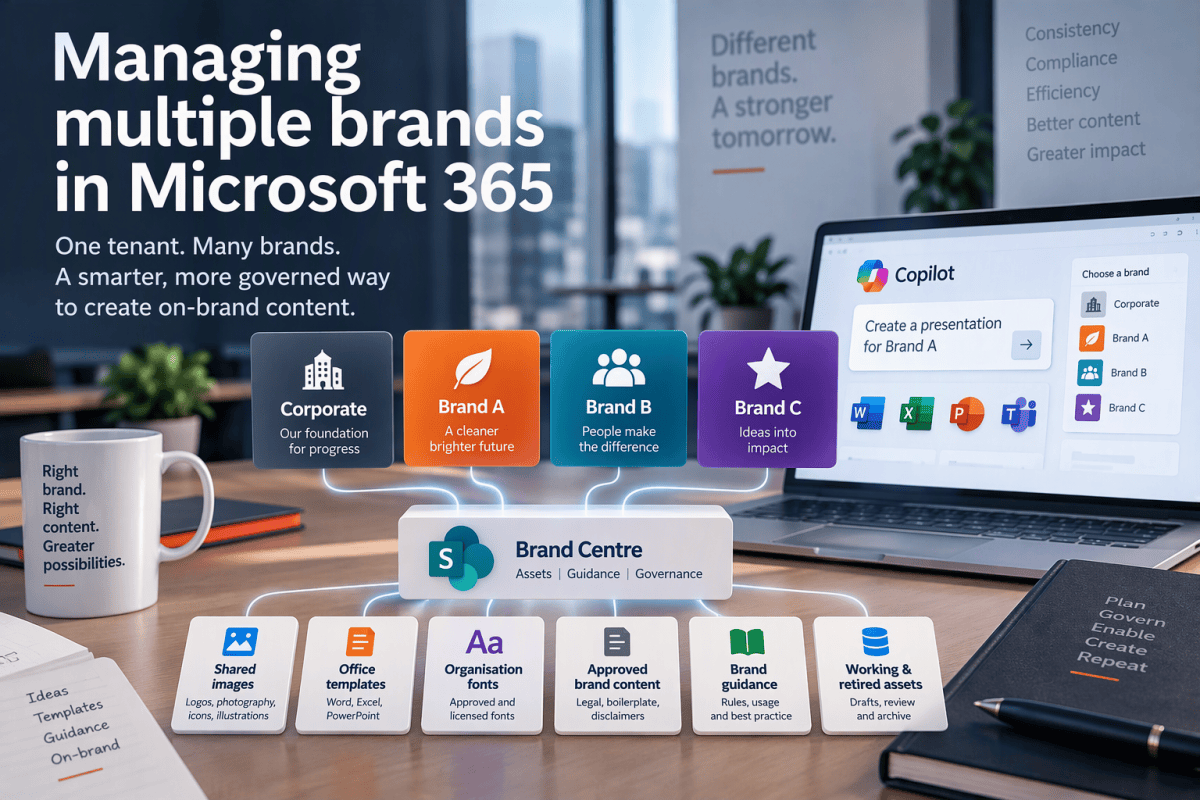
Brand Centre, Brand Kits and Organisational Asset Libraries
A corporate group may own several trading companies. A university may have institutional, research and student-facing identities. A professional services business may operate distinct practices. An acquisition may need to retain its existing brand, at least until someone decides what the long-term plan actually is.
Organisations rarely struggle to manage their internal branding because they lack logos, colours or typography. They struggle because the assets that make content consistent, compliant and reusable are scattered across SharePoint sites, Teams, personal OneDrives and old email attachments. Managing multiple brands, with their various shared and specific elements, within a single tenant, using Brand Centre, Brand Kits and Organisational Asset Libraries (OLAs) is rather more interesting, and requires some planning.
There are questions to address:
- Which brand does this asset belong to?
- Which assets are genuinely shared?
- Who owns and approves each brand?
- Which brands are permitted to use it?
- Which version is current?
- How does a user select the correct brand?
- How does Copilot know which identity it should apply?
- What happens when a brand is acquired, merged or retired?
Building on Brand Centre and Brand Kits
This is the third article in what has inadvertently become a short series on Microsoft’s brand-management architecture.
In Brand Centre vs Brand Kit, I looked at the difference between the two capabilities. The short version is that Brand Centre helps manage and distribute assets, while Brand Kits describe how those assets and rules should be applied.
I then revisited the subject in More on Brand Kits in Microsoft 365 Copilot, looking at the growing role of Brand Kits, Brand Reviewer and Copilot-supported content creation.
I am not going to repeat all of that here. Those articles explain the capabilities and how they fit together. This article takes the next step: how to turn them into a practical operating model when your Microsoft 365 tenant contains multiple brands.
The short answer
The core design principle is this:
Create a separate official Brand Kit for each distinct brand, centralise the governance framework, share only those assets that are genuinely shared, and use separate libraries wherever brand separation matters.
That sounds simple enough. It is also where organisations tend to go wrong. One common approach is to place everything in one enormous library and attempt to distinguish Brand A from Brand B using folders called Brand A and Brand B. This works until somebody searches rather than browses, metadata is missing, or a well-meaning colleague uses the wrong logo in a customer proposal.
The other extreme is to create a separate copy of every image, template, font and disclaimer for every brand. This provides separation, but also creates several supposedly authoritative copies of the same asset. Updating them becomes an exercise in confidence rather than control.
The better answer is a hybrid architecture.
A hub-and-spoke model
For most multi-brand organisations, I recommend a hub-and-spoke model. The hub is a central Brand Centre site containing the Organisational Asset Libraries, governed content, guidance and management records used across the tenant. The spokes are the official Brand Kits, with one kit for each recognised brand.
Conceptually, it looks like this:
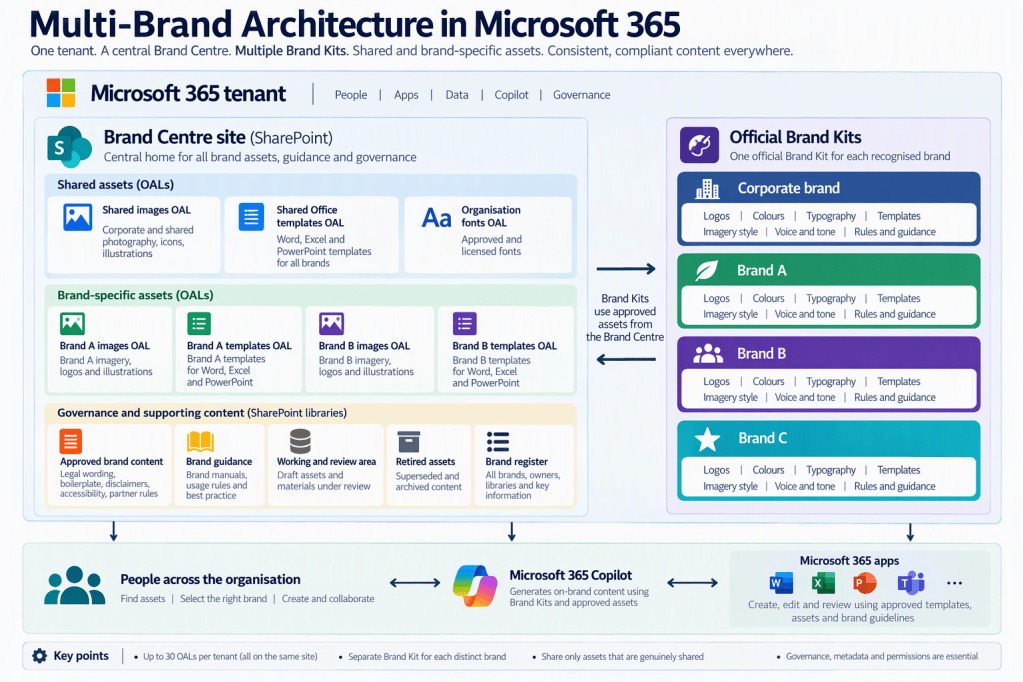
Microsoft currently allows up to 30 Organisational Asset Libraries in a tenant. All those libraries must be located on the same SharePoint site. Not that assigning OAL status applies to a complete library, you can’t do it for individual folders. That makes the architecture of the Brand Centre site rather more important than it might first appear. Read more about OALs here: OAL requirements and limits.
What counts as a brand
Before creating any libraries or Brand Kits, establish which identities you are actually managing. Organisations have a habit of treating every department, campaign, event and enthusiastic marketing initiative as a separate brand. That way lies a very colourful form of chaos.
A useful classification has four broad levels.
The corporate brand
This is the identity of the parent organisation or group. It may cover:
- Corporate reporting
- Group-wide communications
- Investor or stakeholder material
- Internal communications
- Parent-company presentations
- Shared legal identity
- Group policies and governance
The corporate brand may be customer-facing, or it may sit quietly behind a collection of better-known operating brands.
Operating brands
These are the distinct identities through which the organisation provides products or services. Each operating brand may have its own:
- Logos
- Colour palette
- Typography
- Templates
- Photography
- Iconography
- Tone of voice
- Terminology
- Product names
- Customer audience
If those characteristics are substantially different, the operating brand should have its own official Brand Kit.
Endorsed brands
An endorsed brand retains its own identity but makes its relationship with the parent organisation visible. For example:
Brand A, part of Northstar Group
The brand may retain its existing logo, colours and voice while using an approved endorsement mark, common legal wording or selected group assets. This will normally justify a separate Brand Kit, but with clearly governed links to the parent brand.
Campaigns, programmes and events
A campaign may have its own visual treatment without becoming a fully governed brand. Ask whether the identity is:
- Long-lived
- Used by many people
- Applied across several content types
- Supported by clear ownership
- Distinct enough to require separate rules
- Important enough to maintain over time
If the answer is largely no, it probably needs a controlled collection of campaign assets within an existing brand, not another official Brand Kit. Otherwise, six months later, users will be presented with fifteen apparently official kits and no earthly idea which one they are meant to use.
One official Brand Kit per distinct identity
Once you have classified the brands, create one official Brand Kit for each identity that genuinely needs independent rules. Microsoft supports multiple official Brand Kits within an organisation. Each kit can contain assets and guidance relating to a particular brand, including logos, colour palettes, fonts, images, templates and visual or verbal rules (see Create and manage Brand Kits). The name of each kit should be painfully obvious; if users must already understand the internal structure of Marketing before they can choose a Brand Kit, the naming has failed.
Good examples include:
- Northstar Group – Official
- Northstar Consulting – Official
- Northstar Health – Official
- Northstar Energy – Official

Try to avoid things like Corporate, Main, New Brand, Marketing Kit, Brand 2026, Current Version, Jenny’s New One. In fact I would make those punishable by ‘Information Architecture Failure of the Month’ badges, but that’s just me.
If there are regional brands that genuinely differ, include the region:
- Brand A – UK – Official
- Brand A – Europe – Official
Do not create regional kits simply because different teams manage the content. Different ownership does not necessarily mean a different brand.
Brand Kits manage the rules, not the entire estate
A Brand Kit should represent one coherent brand identity. It should not become the only place in which everything remotely associated with that identity is kept. A useful division of responsibility is:
A Brand Kit defines:
- Which identity is being applied
- Approved logos
- Colours
- Typography
- Templates and layout patterns
- Photography and image treatment
- Icon and illustration styles
- Data-visualisation rules
- Voice and tone
- Preferred terminology
- Visual and verbal dos and don’ts
Meanwhile, Organisational Asset Libraries make the actual approved assets available through supported Microsoft 365 applications etc, i.e.:
- Images
- Logos
- Illustrations
- Icons
- Office templates
- Organisational fonts
- Brand Kit resources
Boiler plate text etc.
Not every governed document needs to be an organisational asset. You probably should share standard boiler plate text and other content, but they are not part of your brand and it’s doubtful that they should be shared using an OAL. It would be better to add them into your managed templates (which should be distributed via an OAL), or as a Building Block etc in your standard Word document template (Normal.dotx).
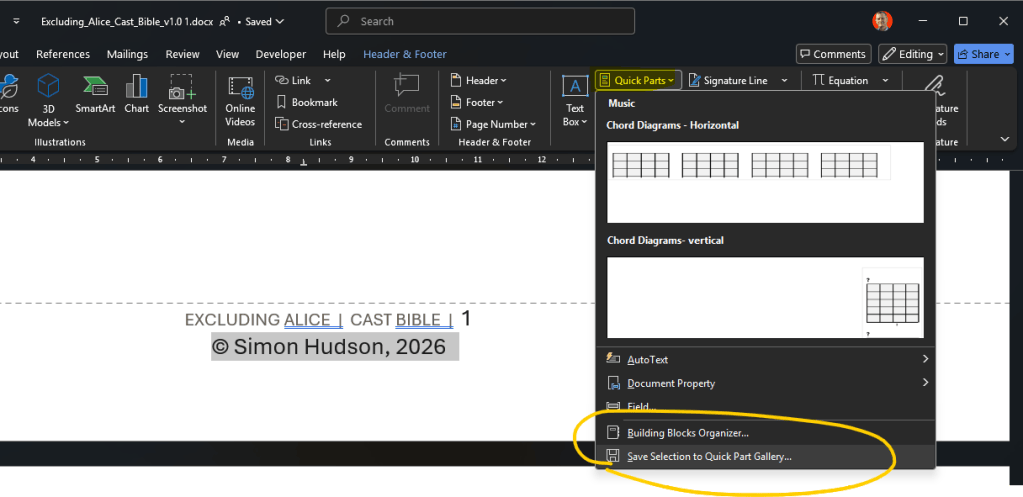
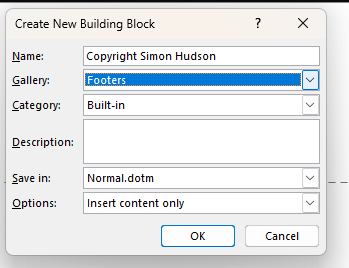
This distinction matters because an OAL is not simply a SharePoint library with a more impressive name. It is a library designated to surface particular asset types through supported Microsoft 365 experiences.
In other words, you should not aim to treat the following as brand elements, but you might include checks for them in the Brand Kit skill:
- Legal wording
- Regulatory statements
- Corporate and product boilerplate
- Accessibility wording
- Approved biographies
- Detailed brand manuals
- Source design files
Structuring your OALs
There are three practical patterns for handling multiple brands.
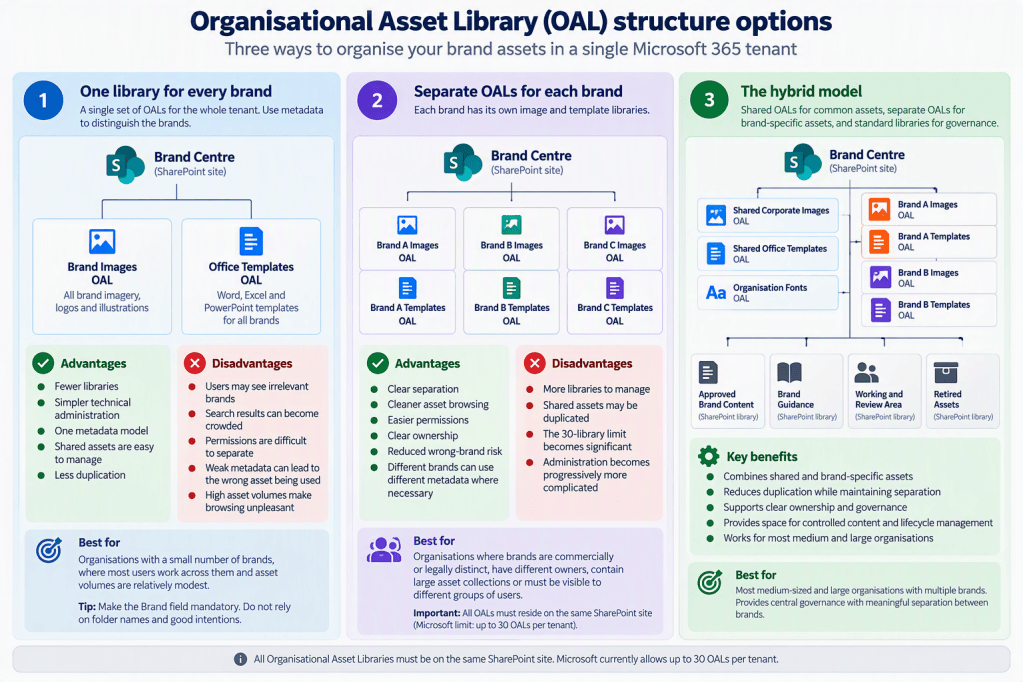
Pattern one: one library for every brand
The simplest model uses one image library and one template library for the whole tenant. Use metadata to distinguish the brands.
This model can work where the organisation has only a few brands, most users work across them and the asset collections are relatively small. If you choose it, make the Brand field mandatory. Do not rely on folder names and good intentions.
Advantages
- Fewer libraries
- Simpler technical administration
- One metadata model
- Shared assets are easy to manage
- Less duplication
Disadvantages
- Users may see irrelevant brands
- Search results can become crowded
- Permissions are difficult to separate
- Weak metadata can lead to the wrong asset being used
- High asset volumes make browsing unpleasant
Pattern two: separate OALs for each brand
This model is appropriate where brands are commercially or legally distinct, have different owners, contain large asset collections or must be visible to different groups of users. Remember that all these OALs still need to reside on the same SharePoint site. Spreading each brand’s OALs across separate SharePoint sites may look tidy on an architecture diagram, but it does not match Microsoft’s current OAL model. It’ll break.
Advantages
- Clear separation
- Cleaner asset browsing
- Easier permissions
- Clear ownership
- Reduced wrong-brand risk
- Different brands can use different metadata where necessary
Disadvantages
- More libraries to manage
- Shared assets may be duplicated
- The 30-library limit becomes significant
- Administration becomes progressively more complicated
Pattern three: the hybrid model
For most medium-sized and large organisations, this is the approach I would start with. It provides central governance without pretending that all brands are interchangeable, and it avoids copying every shared image into half a dozen libraries merely to maintain symmetry.
The hybrid approach combines:
- Shared OALs for genuinely common assets
- Separate OALs for major brand-specific collections
- Standard SharePoint libraries for controlled wording, guidance and records
What is a shared asset?
Shared should mean approved for use by more than one brand, not simply someone couldn’t decide where else to put it! Ask four questions:
- Can the asset be used without identifying a particular brand?
- Is it approved for all the brands that will see it?
- Would using it with the wrong brand create confusion or risk?
- Is there genuinely one centrally maintained version?
Potential shared assets include:
- Generic workplace photography
- Common icons
- Group-wide diagrams
- Accessibility symbols
- Corporate legal marks
- Brand-neutral internal templates
- Parent-company material
Brand-specific assets are more likely to include:
- Logos
- Product photography
- Customer-facing templates
- Branded diagrams
- Campaign visuals
- Distinctive illustrations
- Brand-specific chart styles
- Endorsement marks
An image being vaguely corporate does not make it universally appropriate.
Metadata becomes part of the brand architecture
Once several brands share a tenant, metadata stops being administrative decoration, it becomes part of the control model. You know, that governance thing we keep telling you to pay attention to.
Consider including the following columns in the asset libraries (yes, I know that’s a lot. You get to choose):
- Brand
- Asset title
- Asset type
- Description
- Owner
- Approval status
- Approved date
- Review date
- Expiry date
- Audience
- Geographic market
- Permitted channel
- Usage rights
- Copyright owner
- Search keywords
For a multi-brand environment, I would also add the following.
Brand relationship
- Corporate
- Brand-specific
- Shared across all brands
- Shared across selected brands
- Endorsed brand
- Campaign
Permitted brands
This identifies the brands authorised to use an asset. A managed metadata field is preferable to free text. Otherwise, Brand A, Brand-A and A Brand will inevitably become three different things before lunchtime.
External-use status
- Internal only
- External approved
- Restricted
- Approval required
Asset status
- Draft
- Under review
- Approved
- Superseded
- Retired
Only approved assets should appear in production OALs.
Images
For image libraries, metadata also improves retrieval. Microsoft’s Brand Images guidance says that image search can use information including tags, filenames, descriptions and location. See Microsoft’s guidance on connecting image OALs to PowerPoint and improving search.

A file called IMG_8426-final-final-v3.png is not a meaningful description. It is a cry for help, and a candidate for that badge proposed above.
OAL icons
Top tip: Ensure each of your OALs are created with a clear, informative icon/tile image. It’s important that staff can quickly and easily identify which OAL library the logos etc. they are looking for are in; tile images really help with that.
Frankly, Microsoft have made it far too hard to put those images somewhere that can be easily referenced in the Power shell script. But then there should be a proper UI mechanism for creating OALs, not just Powershell. Perhaps they ran out of money before finishing the job…
Libraries or folders?
Chances are you have all your assets in a bunch of folders, instead of discrete libraries. Go and fix that now, OALs need to have some disticnt types of content (see below). Also use separate libraries when the distinction affects: Permissions, Ownership, Approval, User experience, Search relevance, Compliance or Lifecycle management.
It’s OK to use folders when the contents still share the same ownership, permissions and governance model, and the folders provide a useful browsing aid. If your folders are more than a couple of levels deep you probably have a problem.
Again, the important technical point is that OAL designation applies to a library, not a folder. You cannot designate the Brand A folder within a large shared library as a separate OAL. A folder called Brand A may help a person navigate the library. It does not create a Brand A asset service.
Permissions
Permissions should distinguish between consuming approved assets and managing them.
Consumers
Most users need read access so they can find and use approved content. Microsoft states that users need at least read access to the OAL site for organisational assets to appear in supported Office desktop applications.
Contributors
Contributors can submit or update prospective assets but should not necessarily be able to approve them. Possible groups include:
- Brand A Asset Contributors
- Brand B Asset Contributors
- Corporate Template Contributors
Approvers
Approvers confirm that content is suitable for publication, e.g.
- Brand A Asset Approvers
- Corporate Communications Approvers
- Legal Content Approvers
Brand Managers and multiple brands
Microsoft’s Enterprise Brand Manager policy uses a mail-enabled security group to identify those allowed to create, edit and publish official Brand Kits. Members of the configured group receive the Brand Manager capability. Group ownership alone does not grant it. See Microsoft Brand Manager policy and group requirements. In a multi-brand tenant, this introduces an interesting governance problem. Giving someone the technical ability to manage official Brand Kits does not necessarily mean they should be authorised to change every brand in the organisation.
I would use a model along these lines.
Tenant brand governance group
Responsible for:
- Overall architecture
- Brand classification
- Naming standards
- Approval principles
- Creation of new official Brand Kits
- Retirement of brands
- Shared assets
- Cross-brand conflicts
- Microsoft 365 integration
Lead Brand Manager
Responsible for:
- The corporate identity
- Shared policy
- Coordinating the Brand Managers
- Quality standards
- Escalation
Individual brand owners
Responsible for:
- Brand-specific guidance
- Asset approval
- Template quality
- Voice and terminology
- Scheduled review
- Advising the lead Brand Manager of changes
Microsoft 365 administrators
Responsible for:
- Security-group membership
- Policy configuration
- OAL registration
- Site permissions
- CDN configuration
- Font publication
- Technical assurance
The platform may provide broad administrative capability. Your operating model must still define who is entitled to change each brand.
Fonts
Fonts deserve particular care in a multi-brand environment. You may have:
- A corporate typeface
- A different typeface belonging to an acquired brand
- Product-specific display fonts
- Common fallback fonts
- Fonts licensed for only one brand or market
Organisational fonts use an OfficeFontLibrary, a public Office CDN and the Set-SPOCustomFontCatalog cmdlet. Microsoft documents organisational-font support for PowerPoint and Word for the web. The published font files and catalogue are publicly hosted in the cloud, so the licence must allow that form of distribution. Microsoft explains the organisational-font configuration and licensing considerations.
Treat the font library as a controlled tenant-wide catalogue, not as somewhere to deposit every font ever received from a designer. The Brand Kit then identifies which of those approved fonts belongs to the individual brand.
Templates
Where brands have genuinely different visual identities, they need properly designed templates. Copying the corporate template, changing the logo and calling the file Brand-B-final.potx is technically possible, but badge-worthy. It is not a template strategy. A useful brand template should include:
- Correct theme colours
- Heading and body fonts
- Appropriate layouts
- Picture placeholders
- Representative sample slides
- Chart styles
- Tables
- Diagrams
- Section dividers
- Brand-specific visual patterns
As I covered in More on Brand Kits in Microsoft 365 Copilot, template quality is particularly important when Copilot is expected to create branded presentations. In a multi-brand environment, filenames should also make the intended brand unambiguous:
Avoid names such as: New-Corporate-Template-Final-v7.potx, Marketing-Deck.potx, Main-Template.potx
Brand management
Some thoughts on this.
Acquired brands need a transition plan
Acquisitions are among the strongest reasons for adopting a formal multi-brand architecture.
A newly acquired business may need to retain its existing identity while gradually adopting group standards. This is not a binary choice between leaving everything untouched and changing the logo on day one.
A practical transition has three phases.
Preserve
- Create a separate Brand Kit for the acquired brand.
- identify the authoritative assets.
- Confirm ownership.
- Remove obsolete duplicates.
- Check font and image licensing.
- Document legal and geographic restrictions.
Align
- Introduce common accessibility requirements.
- Apply shared governance and metadata.
- Standardise approval processes.
- Move genuinely common assets into shared libraries.
- Introduce endorsement rules where appropriate.
Consolidate or retain
The organisation then decides whether to:
- Retain the independent brand
- Adopt an endorsed-brand model
- Merge the brand into the corporate identity
- Retire it completely
When a brand is retired, its Brand Kit, templates, images, fonts and guidance should be withdrawn in a controlled sequence. Deleting the logo from SharePoint while leaving the old PowerPoint template circulating through email is not brand retirement. It is brand archaeology.
Brand lifecycle
Every official brand should have:
- An accountable owner
- A designated Brand Manager
- An approval process
- A review schedule
- A change process
- An emergency correction process
- An asset-retirement process
- A licensing review
- Template testing
- Brand Kit testing
- Copilot and Brand Reviewer testing
When a brand changes, review the entire dependency chain. Updating only the Brand Kit produces an apparently modern brand sitting on top of outdated templates and obsolete assets. It may look centralised. It is merely inconsistent in one place.
Enter Copilot
Copilot does not remove the need to identify the correct brand. The intended user journey should be:
- Identify the audience, purpose and owning brand.
- Select the appropriate official Brand Kit.
- Use the relevant approved template and assets.
- Allow Copilot to generate or refine content within the supported experience.
- Check imagery, terminology, claims and mandatory wording.
- Use Brand Reviewer where supported.
- Complete any required legal, regulatory or publication approval.
Connecting an OAL to Copilot can make approved brand assets available through supported Microsoft Copilot Create, Word and PowerPoint experiences. Microsoft also documents access to organisational visuals through the Create experience and Visuals pane. However, making an OAL searchable does not mean Copilot will always choose the correct brand, apply every mandatory statement or make a publication decision.
Copilot can help apply the governance model. It is not the governance model.
A practical multi-brand governance matrix
| Governance area | Shared across the tenant | Managed per brand |
|---|---|---|
| Brand Centre site | Yes | No |
| OAL technical configuration | Yes | No |
| Official Brand Kit | No | Yes |
| Brand ownership | No | Yes |
| Brand guidelines | Sometimes | Usually |
| Logos | Rarely | Yes |
| Colour palette | Rarely | Yes |
| Voice and terminology | Rarely | Yes |
| Corporate photography | Often | Sometimes |
| Product photography | Rarely | Yes |
| Template structure | Sometimes | Usually |
| Legal boilerplate | Often | Sometimes |
| Font catalogue | Usually | No |
| Font selection | No | Yes |
| Governance framework | Yes | No |
| Asset approval | Framework shared | Decisions per brand |
| Lifecycle policy | Yes | Applied per brand |
The principle behind the table is straightforward:
Centralise the framework and genuinely shared assets. Separate the identity, ownership, rules and distinctive assets of each brand.
PowerShell examples for a hybrid architecture
There are some useful Powershell commands to help with all the above. I’ve assumed that the SharePoint site and libraries already exist and that the libraries are all located on the same Brand Centre site.
Shared image library
Add-SPOOrgAssetsLibrary-LibraryUrl "https://tenant.sharepoint.com/sites/BrandCentre/SharedImages"-ThumbnailUrl "https://tenant.sharepoint.com/sites/BrandCentre/SharedImages/thumbnail.png" `-OrgAssetType ImageDocumentLibrary-CdnType Public-CopilotSearchable $true
Brand image library
Add-SPOOrgAssetsLibrary-LibraryUrl "https://tenant.sharepoint.com/sites/BrandCentre/BrandAImages"-ThumbnailUrl "https://tenant.sharepoint.com/sites/BrandCentre/BrandAImages/thumbnail.png" `-OrgAssetType ImageDocumentLibrary-CdnType Public-CopilotSearchable $true
Brand template library
Add-SPOOrgAssetsLibrary-LibraryUrl "https://tenant.sharepoint.com/sites/BrandCentre/BrandATemplates"-ThumbnailUrl "https://tenant.sharepoint.com/sites/BrandCentre/BrandATemplates/thumbnail.png" `-OrgAssetType OfficeTemplateLibrary-CdnType Public
Organisation font library
Add-SPOOrgAssetsLibrary-LibraryUrl "https://tenant.sharepoint.com/sites/BrandCentre/Fonts"-OrgAssetType OfficeFontLibrary-CdnType Public
The complete approved font catalogue is then generated and published:
Set-SPOCustomFontCatalog-FontFolder "C:\OrganisationFonts"-LibraryUrl "https://tenant.sharepoint.com/sites/BrandCentre/Fonts"
Before publishing any font, confirm that its licence permits cloud hosting and the intended organisation-wide use.
Common mistakes
One Brand Kit containing every brand
A Brand Kit should represent one coherent identity. Putting several brands into one kit reintroduces the ambiguity the kit is meant to remove.
A Brand Kit for every department
Departments are not automatically brands. Ownership and organisational structure are separate from brand identity.
Folders pretending to be OALs
OAL designation is applied to libraries, not folders. A folder can support navigation, but it does not create an independently governed or surfaced asset library. [learn.microsoft.com]
Shared assets copied everywhere
Several copies create several apparently authoritative versions. Keep one governed source unless the asset has genuinely been adapted for a specific brand.
Filenames doing all the work
Good filenames help. They do not replace metadata, approval and ownership.
Every Brand Manager changing every brand
Platform access and organisational authority are not the same thing. Define who is authorised to approve and change each brand.
Acquired assets left in Teams and OneDrive
If the assets remain scattered across personal and team locations, they cannot be governed or retired reliably.
Retiring the Brand Kit but leaving the templates
Old brands survive through copied presentations, local templates and historic documents. Retirement must cover the complete asset lifecycle.
Assuming Copilot completes the approval process
Copilot and Brand Reviewer can improve consistency. They do not replace legal, regulatory, marketing or publication approval.
Conclusion
Brand Centre, Organisational Asset Libraries and Brand Kits solve different parts of the same problem.
- Brand Centre provides the governed home.
- OALs distribute approved assets through supported Microsoft 365 experiences.
- Brand Kits define the rules and behaviour for each recognised brand.
- Copilot uses those assets and rules within the capabilities of the particular application.
- People remain accountable for choosing the appropriate brand and approving the final content.
For a single brand, that combination is useful. For several brands in one tenant, it is essential. The objective is not to place everything in one enormous library, nor to reproduce the same assets repeatedly for every identity. It is to create a system in which the boundary between shared and brand-specific content is deliberate and governed.
Done well, each brand has a clear identity. Every identity has an accountable owner. Shared assets have one authoritative source. Brand-specific assets remain distinct. Users can select the right brand without guesswork. Copilot receives coherent guidance. Templates, fonts and imagery follow controlled lifecycles. Retired brands do not linger indefinitely in search results and old presentations.
That is the difference between storing several sets of logos in Microsoft 365 and operating a proper multi-brand governance architecture.
References
- Brand Centre vs Brand Kit
- More on Brand Kits in Microsoft 365 Copilot
- Create and manage official Brand Kits in Microsoft Copilot
- Enterprise Brand Manager policy setup
- Create an organisation assets library
- Connect OALs to Copilot
- Access an OAL in the Microsoft Copilot app
- Fonts and PowerPoint


