Add shortcut to OneDrive seems like such a nice idea; a useful alternative to the oft-maligned Sync function for those needing desktop access to their files.
But all is not well in Wonderland
 Novia Works Ltd
Add shortcut to OneDrive seems like such a nice idea; a useful alternative to the oft-maligned Sync function for those needing desktop access to their files.
But all is not well in Wonderland

To build a great content management solution in SharePoint you should use Content Types. Simon Hudson and Mats Warnolf tell you how and why.

I use Microsoft Planner and To Do for lightweight project management, preferring its simplicity. The announcement of a unified Planner experience merging Planner, To Do, and Project, had me spooked.
This blog unpicks the impacts for the ordinary user.

AI has become great at many things; it can even transform terrible handwriting into typewritten text. I share the journey of discovery from scrawl to near perfect transcription.

This blog describes a method for separating ‘proper’ templates from ‘kind-of’ templates in SharePoint libraries, using the file extension and some nifty column formatting courtesy of Microsoft Copilot.

You want to open PDFs into Acrobat so you can sign them, add comments etc.
Your browser wants to open them in its PDF viewer which can’t do that.
This blog tells you how to be the victor in this mighty battle.

The SharePoint Brand Centre (or Center if you must) started appearing throughout September 2024, following announcements the previous year. It offers organisations a central place to manage and internally promote their brand, while also enabling brand fonts and themes to be applied throughout SharePoint and Viva Connections.
This article explores it in more depth; helps you get up and running and talks about what it can, and currently cannot do.

Keyboard shortcuts are built into Microsoft Teams and, to an extent to SharePoint Online. This is a useful list of them.
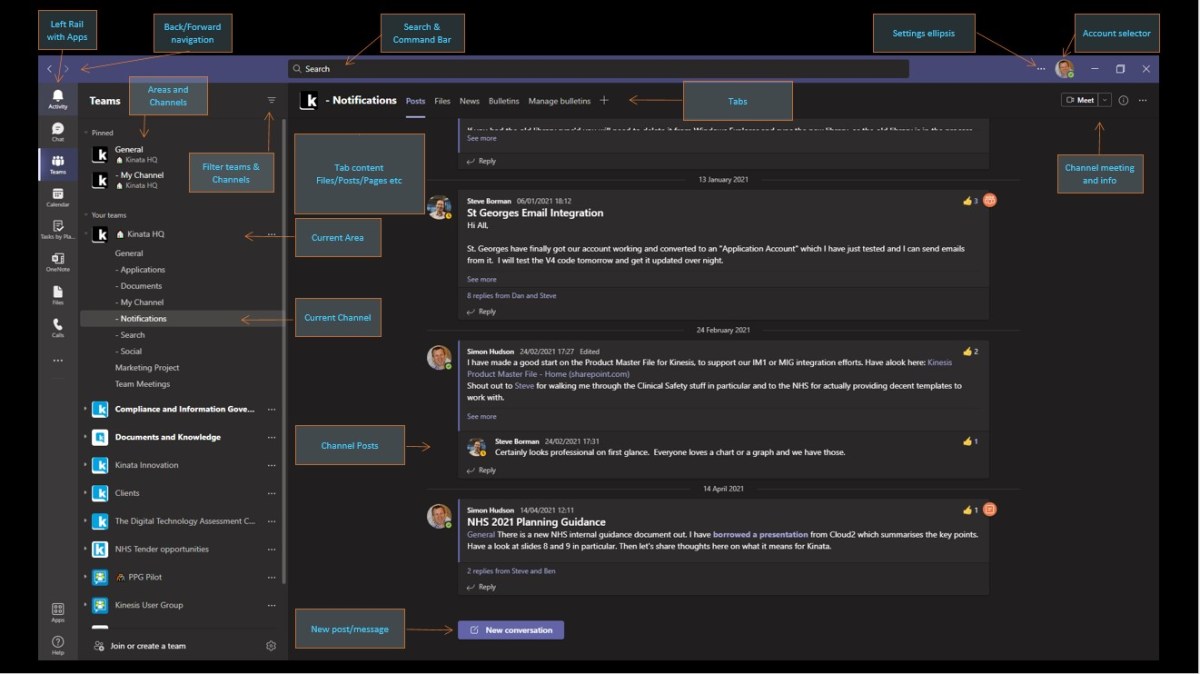
Over a quarter of a billion people and 1 million organisations use Microsoft Teams. A shinkingly small proportion of those know all the neat tricks and good practices at the front end. Watch this New York City user group session to help fill in the blanks.

The question of whether you need backup when everything is in the cloud continues to prompt debate. The debate continues here. Some light has been shed…

When creating a Teams meeting from Outlook you will, at some point, experience the “When the meeting starts, we’ll let people know you’re waiting” message of doom. Learn to avoid it here.

If your dates appear to be wrong in SharePoint or Microsoft Lists there is a good chance that you haven’t set the Regional Format and Time Zone for the site and the tenant defaults.
Find out how to fix that.

